

Overview
JWT (JSON Web Token) authentication is a standard method for securely verifying user identity. By implementing JWT authentication, you add a critical layer of security to your data collection process with MoEngage. The feature ensures that the data sent on behalf of your identified users is authentic and has not been tampered with. This security is achieved by requiring a token that is cryptographically signed by your own server, which prevents unauthorized users from impersonating your legitimate users.PrerequisitesBefore you begin the implementation, ensure you meet the following requirements:
- Your application must use the MoEngage React Native Core plugin version 12.9.1 or higher to access the JWT authentication feature.
- You must have access to your MoEngage dashboard to manage public keys and configure the feature’s enforcement settings. For detailed information on enforcement settings, refer here.
Integration
Perform the following to integrate JWT authentication into your React Native application.Step 1: Enable JWT Authentication
Enable JWT authentication during native SDK initialization on each platform. Follow the instructions that match the initialization method your application uses. Steps 2 and 3 are the same for both methods.Android
Manual Initialization Configure the NetworkAuthorizationConfig property on the MoEngage.Builder object. For more information, refer to Android SDK Initialization.moengage.xml configuration file. For more information, refer to File Based Initialization.
moengage.xml
iOS
Manual Initialization Configure the networkConfig property on the MoEngageSDKConfig object. For more information, refer to iOS SDK Initialization.MoEngage dictionary in your Info.plist. For more information, refer to File Based Initialization.
Info.plist
Step 2: Pass the JWT to the SDK
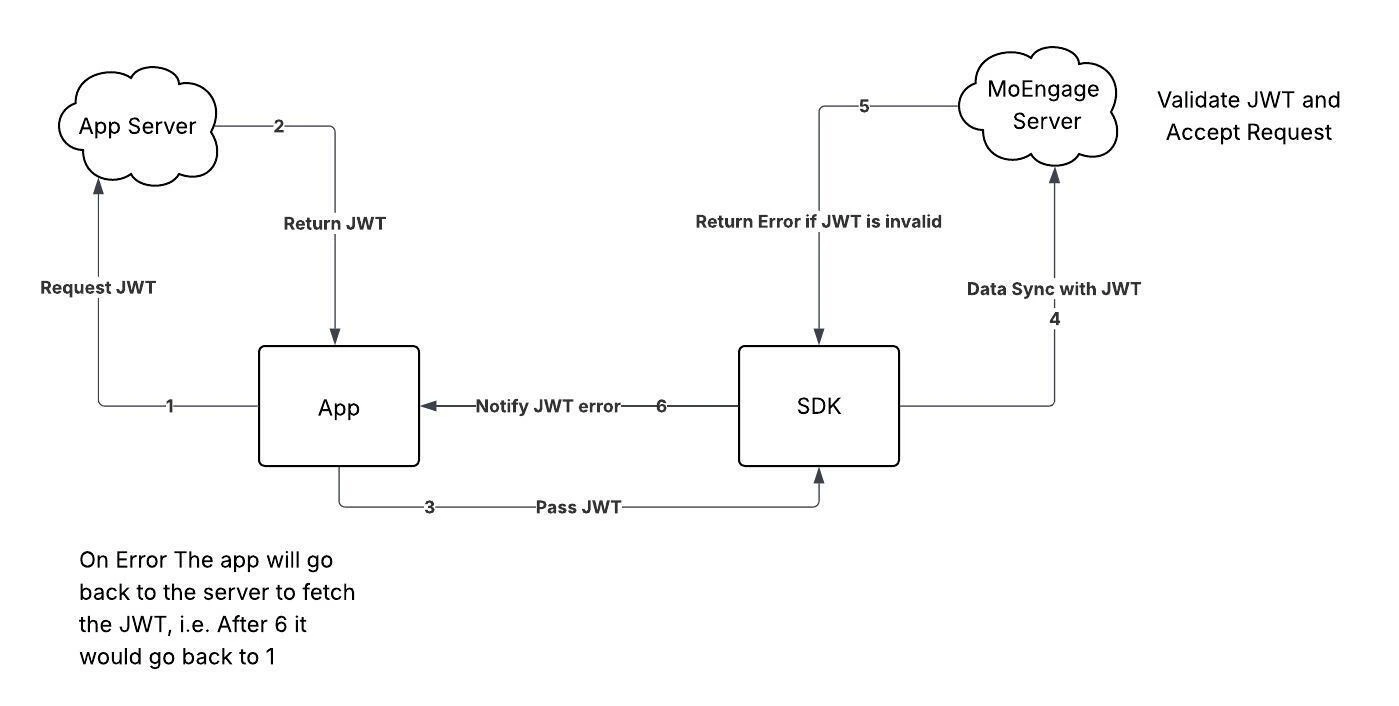
Your application is responsible for managing the JWT lifecycle. The recommended flow is to fetch a token when the user logs in and pass the token to the SDK. You should also check whether the token has expired on subsequent app launches and fetch a new one if necessary. Use the passAuthenticationDetails() method to provide the token to the SDK.TypeScript
Step 3: Register the Listener and Handle Authentication Errors
The SDK delivers token validation errors returned by the MoEngage server through theauthenticationError event. Register a listener for this event so your application can fetch and provide a new token when authentication fails.
Register the listener in a global scope, such as your root component, so your application always receives callbacks.
TypeScript
TypeScript
Interfaces and Enums
The following interfaces, classes, and enums define the data structures used by the JWT authentication methods described in this guide. Use them when constructing your token payload and handling errors.TypeScript
Information
- If an API request fails due to an authentication error, the SDK will not retry the request until your application provides a new token.
- After 10 consecutive authentication failures in a single session, the SDK will stop attempting to sync data until the next session begins. This counter resets after any successful sync.
- Upon user logout, if a data sync fails due to a JWT error, the pending data will be deleted, and no retry will be attempted.