

- 99.9 percent of queries at MoEngage get executed within 30 seconds.
- This feature is handy when your segment is complex (outliers of your creative genius) or you want to send out your campaigns immediately at the scheduled time, without even few seconds of delay.
Enabling Pre-Compute
On the Scheduling page (Step 3) of campaign creation, select the check box Compute target audience in advance to ensure that campaigns are sent faster and at the right time. This is beneficial for cases when you are using a complex segmentation query that usually takes some time to run.
How does it work?
Generally, while running a campaign, segmentation starts at the campaign’s scheduled time and fetches users from the segmentation at the time of sending the campaign so that no potential customer is missed. But in cases where the timing of the message is of greater essence, and marketers don’t want campaigns to be delayed by even a few minutes taken to calculate segments, pre-compute helps ensure timely delivery. Pre-Compute solves this problem by running the segmentation query in advance anytime between 30 mins to 2 hours. Hence, at the campaign send time, the target users are already available, and campaign sending starts right away at the scheduled time without any delays.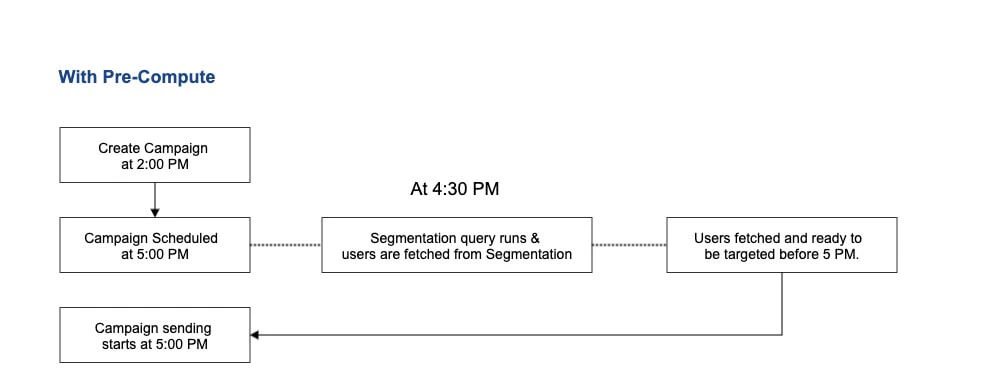
Using Precompute in a campaign comes with a trade-off that some users may be excluded from the campaign. When segmentation is performed before the campaign start time (e.g., 30 minutes prior), any users meeting the criteria after the precomputation but before the campaign launch are not included in the campaign.For Example, if a campaign targeting users who performed an “Add to Cart” action in the last 24 hours is scheduled to go live at 5:00 PM, segmentation precomputed at 4:30 PM excludes users who perform the action between 4:30 PM and 5:00 PM.So, it involves the trade-off between the timely delivery of a campaign vs capturing all the intended users.