

Availability of this feature depends on your MoEngage plan and may require a paid add-on. To check what’s available for your plan, refer to Plans and Pricing. To get this feature, contact your MoEngage Customer Success Manager (CSM) or the Support team.
Transactional Alerts
Any time-sensitive transactional content that a brand sends to its customers is a Transactional Alert. The following are examples of transactional alerts:- Order/Booking/Purchase confirmations and pertinent updates
- Shipping/Delivery confirmations and applicable updates
- Security and account alerts for fraud prevention
- Password resets
- OTP (one-time password)/ Verification Code
- User invitations and shares
- User inaction related to previous transactions
Legacy Transactional Messaging Structure
A notification is sent across multiple channels simultaneously, employing a multi-channel transactional messaging structure. To implement such a structure, you would need to:- Build APIs for multiple channels
- Maintain these APIs across all channels and vendors
- Maintain vendor contracts
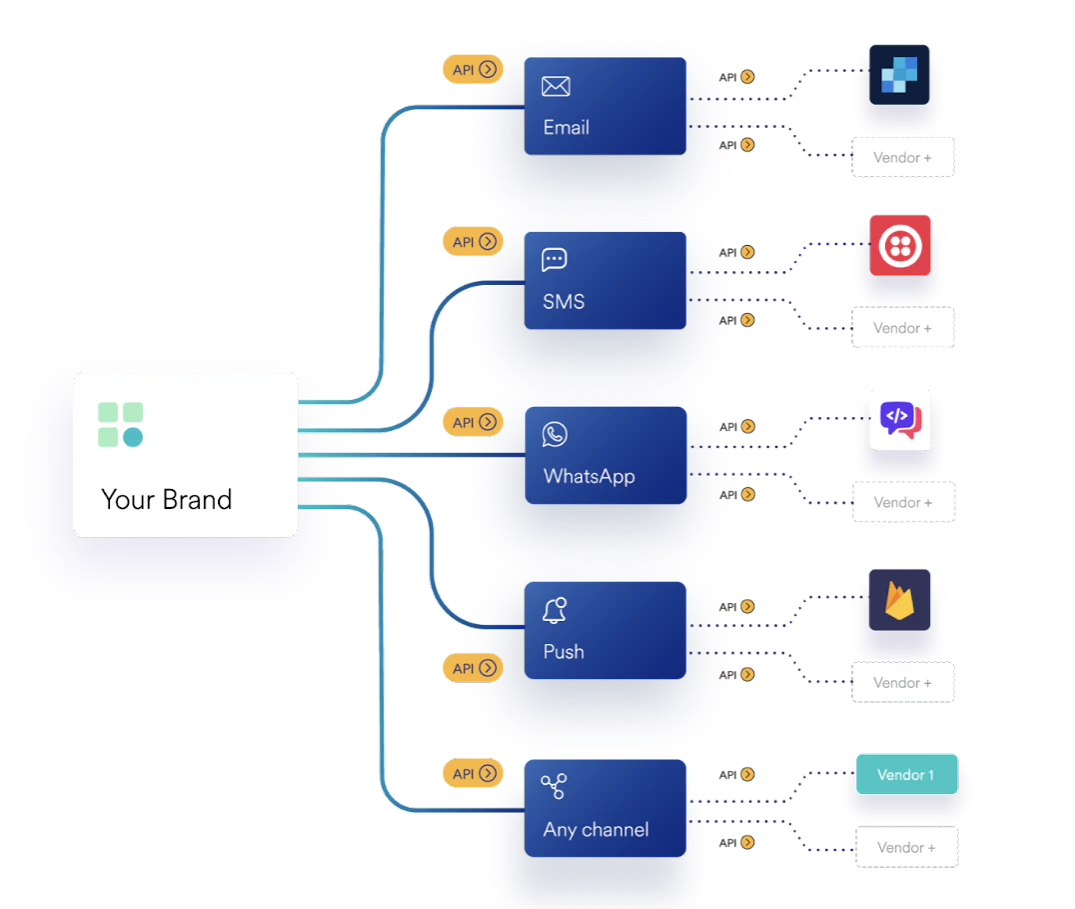
Legacy Structure - Drawbacks
The current Transactional Messaging infrastructure has the following drawbacks:- Lack of requisite developer bandwidth - Heavy reliance on engineering bandwidth to make even the slightest changes
- Lack of visibility on alert (message) performance - Absence of a centralized dashboard to manage alerts, content templates, and delivery partners
- Lack of control over the content - Product, content, and marketing teams have limited control over the content and alert logic because of the wait for engineering bandwidth.
MoEngage Inform
MoEngage Inform enables brands to build and manage transactional alerts across channels through One API. You can build, iterate quickly, and scale effortlessly.Advantages
With MoEngage Inform, brands can utilize a single dashboard without the need to alter or deploy code. It helps to:- send personalized Transactional Messages on multiple channels
- add new channels
- build and edit templates in minutes
- switch seamlessly between messaging vendors
- debug in real time easily with end-to-end logs
- collaborate with the product, growth, and marketing teams to analyze and optimize alerts
Limits and Behavior
Inform inherits the delivery behavior of the underlying channel (SMS, WhatsApp, Email, or Push) for most scenarios. This section highlights the behaviors and limits that are specific to Inform.Impression Tracking
Impression tracking for Inform alerts works the same way as it does for standard Push campaigns. There is no Inform-specific implementation or behavior. For more information, refer to Push Analytics and Info.Fallback Behavior
Inform supports the following fallback mechanisms:- Sender fallback: Automatically selects a sender based on user or API attributes. If none of the configured conditions are met, Inform uses the fallback sender you have configured. For more information, refer to Dynamic Sender Routing.
- Channel fallback (on sender failure): If the default channel fails to submit to the vendor due to payload errors, 4xx or 5xx vendor responses, or vendor rejections, Inform routes the alert to the configured first and second fallback channels. You can configure this per alert under Set Channel Sending Order during alert creation. For more information, refer to Channel Sending Order.
- Channel fallback (on delivery failure): If the default channel accepts the alert but does not deliver it within a configurable wait window (1–60 minutes), Inform reattempts delivery on the configured fallback channel. You can configure this per alert under Set Channel Sending Order. For more information, refer to Channel Sending Order.
- Template fallback: Routes the alert to a fallback template when the configured template-selection conditions are not met. For more information, refer to Dynamic Template Selector.
Subject Line and Content Limits
Inform does not introduce any additional content or subject-line limits beyond those enforced by the underlying channel. Follow the limits documented for the channel you are using. For example, WhatsApp templates enforce a 1,024-character body limit. For more information, refer to Common Errors in WhatsApp Campaigns.Throughput (RPM)
Inform throughput is determined by your contract. By default, Inform supports 10,000 requests per minute (RPM).- The throughput limit is channel-agnostic, meaning the same RPM applies regardless of whether you send alerts through SMS, WhatsApp, Email, or Push.
- If a single Inform API request targets multiple channels, it counts as one API request while generating a separate message for each configured channel.