

Overview
JWT (JSON Web Token) authentication is a standard method for securely verifying user identity. By implementing JWT authentication, you add a critical layer of security to your data collection process with MoEngage. The feature ensures that the data sent on behalf of your identified users is authentic and has not been tampered with. This security is achieved by requiring a token that is cryptographically signed by your own server, which prevents unauthorized users from impersonating your legitimate users.PrerequisitesBefore you begin the implementation, please ensure you meet the following requirements:
- Your application must use the MoEngage iOS SDK version 10.08.0 or higher to access the JWT authentication feature.
- You must have access to your MoEngage dashboard to manage public keys and configure the feature’s enforcement settings.
Integration
Follow these steps to integrate JWT authentication into your iOS application.Step 1: Enable JWT Authentication
You can enable JWT authentication during SDK initialization by configuring the networkConfig.authorizationConfig property on the MoEngageSDKConfig object.Step 2: Pass the JWT to the SDK
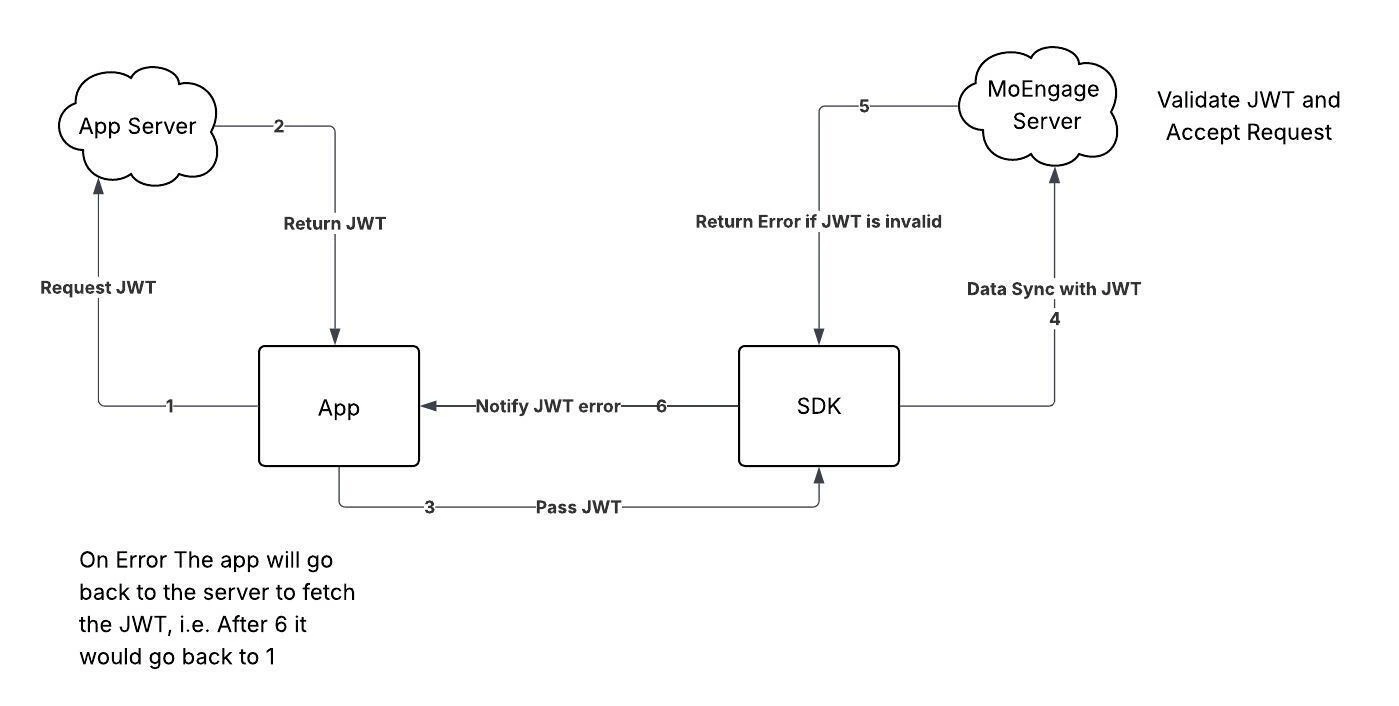
Your application is responsible for managing the JWT lifecycle. The recommended flow is to fetch a token upon user login and pass the token to the SDK. You should also check if the token has expired on subsequent app launches and fetch a new one if necessary. Use the MoEngageSDKCore.passAuthenticationDetails() method to provide the token to the SDK.In the iOS SDK,
DEBUG mode means the SDK was initialized using initializeDefaultTestInstance(_:) (TEST workspace) and the app is running attached to Xcode. This is different from a release build that has debug symbols enabled.Step 3: Handle Authentication Errors
To handle token validation errors that the MoEngage server returns, you must register an error listener using MoEngageSDKCore.registerAuthenticationListener() method. The SDK invokes this listener when an authentication error occurs, which allows your application to fetch and provide a new token.Starting with iOS SDK 11.0.0,
MoEngageAuthenticationError.Listener adopts Sendable and @MainActor isolation, and the SDK invokes onError(_:) on the main actor. Conforming types must remain safe to use across concurrency domains. The example above remains unaffected because it does not capture non-Sendable state.Step 4: Register the listener after SDK initialization
Register the MoEngageAuthenticationError.Listener in a global scope, such as the applicaton(_:didFinishLaunchingWithOptions:) method of your AppDelegate class, to ensure your application always receives callbacks.Information
- If an API request fails due to an authentication error, the SDK will not retry the request until your application provides a new token.
- After 10 consecutive authentication failures in a single session, the SDK will stop attempting to sync data until the next session begins. This counter resets after any successful sync.
- Upon user logout, if a data sync fails due to a JWT error, the pending data will be deleted, and no retry will be attempted.