

MoEngage <> Xoxoday Loyalife
The Xoxoday Loyalife integration bridges your loyalty program data with MoEngage. This connection allows your marketing teams to trigger targeted Push, Email, and SMS campaigns based on specific loyalty milestones, such as points earned, tier upgrades, or impending point expirations. Loyalife synchronizes loyalty events and member profile attributes to MoEngage through an automated nightly process. Once the data is available in MoEngage, you can segment members by their tier, points balance, or activity metrics to drive cross-channel engagement.The Xoxoday Loyalife integration is built and maintained by Xoxoday. For configuration requests or issues specific to integration behavior, contact the Loyalife support team at [email protected].
Use cases
When you connect Xoxoday Loyalife to MoEngage, you can synchronize audience data to support the following use cases:- Reward moments: Trigger immediate notifications after a member earns points by tracking the
loyalty_points_earnedevent to encourage immediate redemption. - Tier milestone campaigns: Automate congratulatory messages and summarize new benefits when a user triggers a
loyalty_tier_upgradedevent. - Expiry nudges: Use the points expiration forecast attribute
points_expiring_30dto send timely reminders before points lapse. - Win-back flows: Segment dormant members using the
days_since_last_activityuser attribute to re-engage users who have not transacted recently. - Segment-based targeting: Target users dynamically as they enter or exit specific Loyalife segments using custom tag sync.
Key Features and Functionality
The Xoxoday Loyalife integration delivers the following core capabilities within MoEngage:- Daily synchronization: Every night at 12 AM, Loyalife executes an automated sync that transmits transactional events and updated profile data to MoEngage.
- User profile updates: Update member profiles with current points balances, enrollment details, and expiry projections to keep your segments accurate.
Supported Data Types
The table below outlines the daily synchronization schemas from Xoxoday Loyalife:| Data Type | What Gets Synced | Frequency |
|---|---|---|
| Loyalty Events | Event name, member identifier, points, earning type, and transaction details. | Nightly sync (daily activities) |
| Member Attributes | Points balance, tier level, account status, enrollment date, activity metrics, and expiry forecasts. | Nightly full refresh |
Integration
PrerequisitesBefore you set up this integration, ensure you have the following:
- An active Xoxoday Loyalife account with administrative access.
- Pre-existing user records in MoEngage with a Customer ID that matches their Loyalife Relation Reference.
- Your MoEngage API credentials: Workspace ID (App ID), Data API Key, and regional Dashboard URL.
Step 1: Configure the Connection in Loyalife
To configure the data flow from the Loyalife admin portal, perform the following steps:- Sign in to your Loyalife admin portal.
-
In the left navigation menu, click Program Settings > Integration.
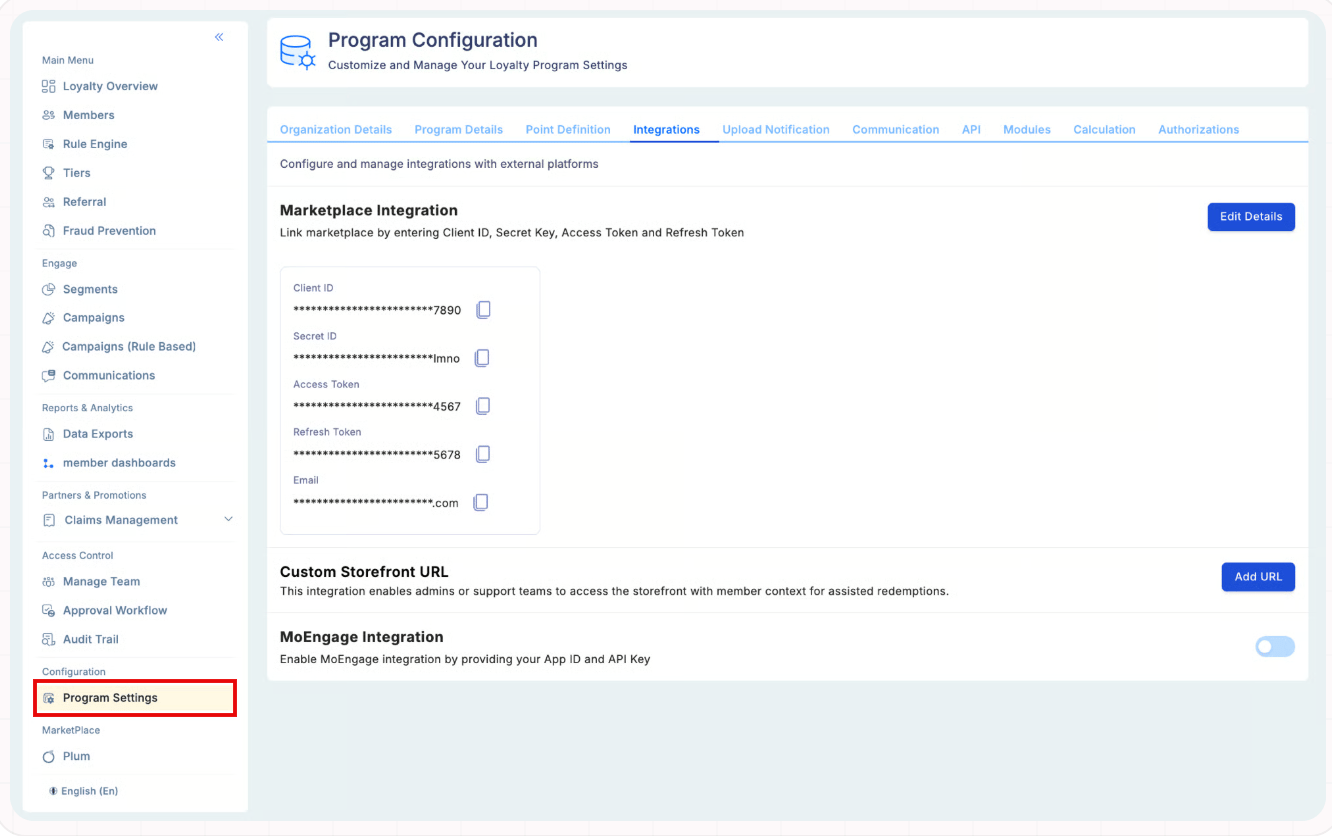
- In the integration catalog, locate the MoEngage Integration section, and then turn the toggle on to open the configuration settings.
-
Enter your integration parameters:
Field Description App ID Your MoEngage Workspace ID. API Key Your MoEngage Data API Key. Dashboard URL Your regional dashboard API URL (for example, https://dashboard-01.moengage.com). -
Click Save.
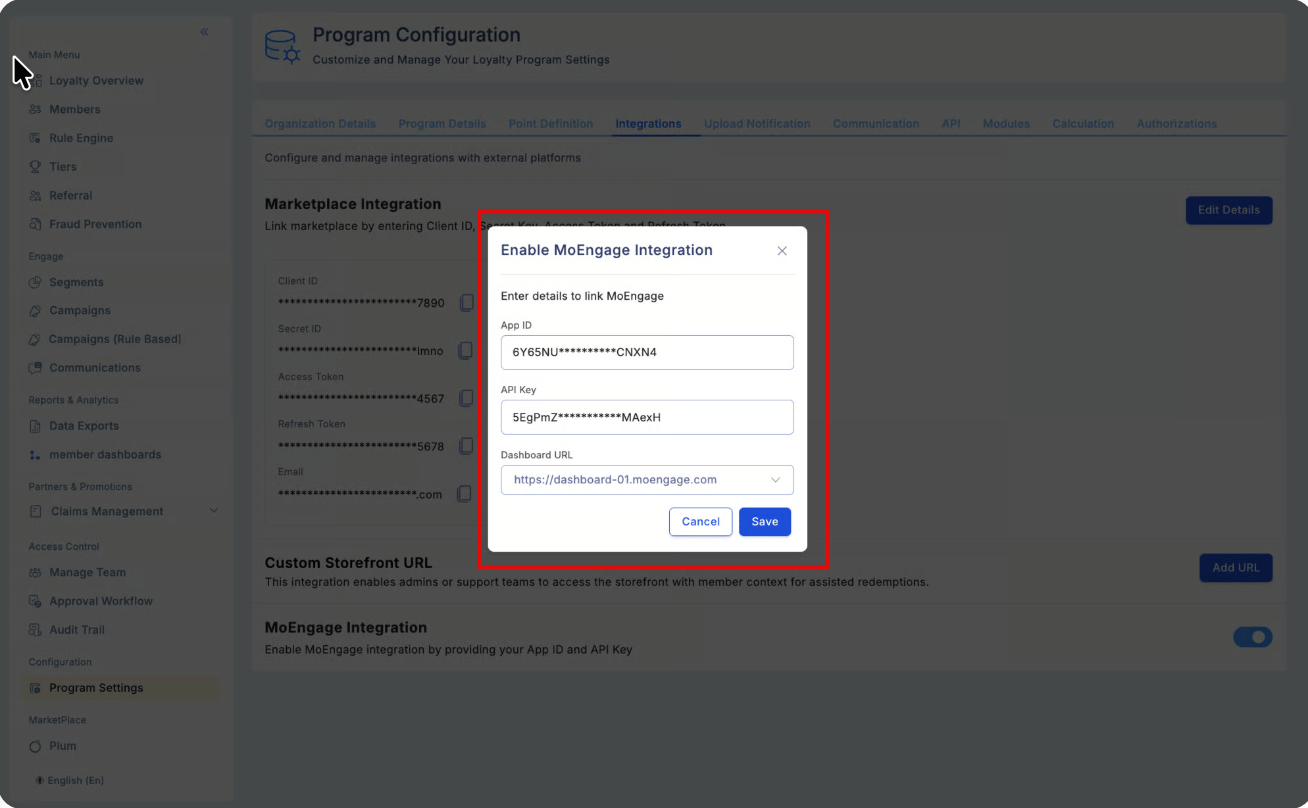
Step 2: Verify Data in MoEngage
After the first nightly sync (post-12 AM), to verify data in MoEngage, perform the following steps:- Audience: Navigate to Audience > Users to confirm attributes like
tierandpoints_availableappear on profiles. - Events: Navigate to Analyse > Events to confirm receipt of events like
loyalty_points_earned.
Step 3: Build Campaigns in MoEngage
To build campaigns in MoEngage, perform the following steps:- Navigate to Engage > Campaigns > + Create campaign.
- Select your channel (Push, Email, or SMS).
- Segment: Use loyalty attributes (for example,
member_lifecycle_stage) to define your audience. - Trigger: For real-time responses, select Event-triggered delivery and choose a loyalty event (for example,
loyalty_tier_upgraded). For more information, refer here.
Troubleshooting
| Issue | Possible Cause | Solution |
|---|---|---|
| Data not appearing. | Mismatched regional endpoint. | Confirm the Dashboard URL matches your MoEngage region. Mismatched regions cause silent API failures. |
| Missing Events. | Identity mapping failure. | Ensure the member’s Relation Reference in Loyalife exactly matches the Customer ID in MoEngage. MoEngage drops the data if it does not find a match. |
| Sync stops unexpectedly. | API Key rotation. | If you rotate your MoEngage API Key, you must update it in the Loyalife Integration settings immediately to prevent sync interruptions. |