You must have an Enterprise plan to use the Radar integration.
Introduction
Radar is a comprehensive location platform that offers geofencing, geocoding, and maps to power location-based experiences across millions of devices worldwide. Its core products include Geofences, Trip Tracking, and Geo APIs.
MoEngage and Radar
The integration between MoEngage and Radar leverages the power of location-based data to enhance your marketing campaigns. You can use Radar’s Geo APIs to show nearby places in MoEngage campaigns, providing users with relevant and contextual information.
With this integration, you can:
- Send location-triggered and location-targeted messages to increase engagement and conversion.
- Synchronize user attributes and events from Radar to MoEngage.
- Automate campaigns when a user is near a physical store.
- Track a user’s journey to trigger campaigns based on their trip data.
Use cases
Integrating Radar with MoEngage helps you solve the following use cases:
- Location-triggered engagement: When users enter or exit a geofence around your physical store, trigger a personalized campaign — such as a promotional message or a special offer — that encourages them to visit.
- Location-targeted campaigns: Send location-based messages to users who are near a specific store or event to drive engagement and conversion with relevant, contextual information.
- Sync user and event data: Automatically sync user attributes and events from Radar to MoEngage. This gives you a unified user profile across both platforms that you can use for targeted marketing.
Integration
To connect MoEngage to Radar, perform the following steps:
-
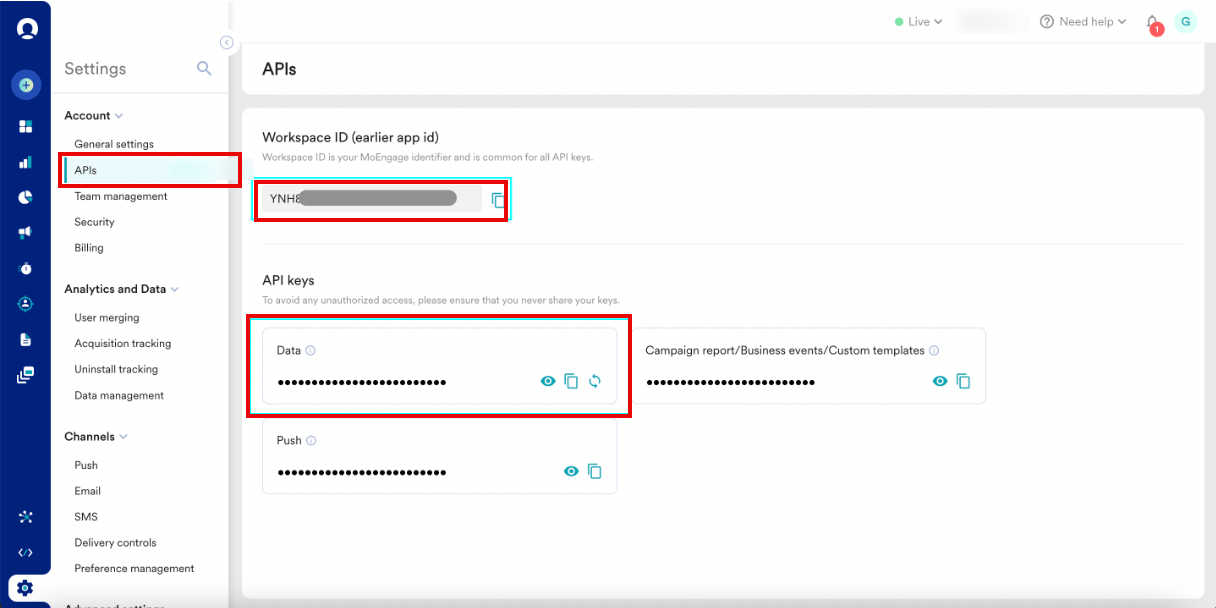
On the MoEngage UI, navigate to Settings > Account > APIs.
-
Copy the value under Workspace ID (formerly App ID).
-
In the API keys section, copy the API key on the Data tile.
-
On the Radar dashboard, navigate to the Integrations page and click MoEngage.
-
Set the Enabled option to Yes, then paste your Workspace ID and Data API Key into their respective fields.
-
Select the API Endpoint that matches your MoEngage data center (for example, if your account is not on
https://api-01.moengage.com, choose the correct endpoint).
After this configuration, Radar automatically sends custom events and user attributes to MoEngage in real time.
-
Set the
moengage:customer_id metadata key on each Radar user to map them to the corresponding MoEngage user profile:
Send Users and Events to MoEngage
This section outlines how user attributes and events flow from Radar to MoEngage.
User Attribute Mapping
The following table shows how Radar user fields map to MoEngage user attributes:
| Radar User Field | MoEngage User Attribute | Type | Example Value |
|---|
metadata[moengage:customer_id] | ID | string | "[email protected]" |
_id | radar_id | string | "5b2c0906f5874b001aecfd8d" |
locationAuthorization | radar_location_authorization | string | "GRANTED_FOREGROUND" |
locationAccuracyAuthorization | radar_location_accuracy_authorization | string | "FULL" |
updatedAt | radar_updated_at | timestamp | "25 Jul 2025, 10:36:17 am" |
segments[*].externalId | radar_segment_external_ids | array[string] | ["starbucks-visitors"] |
topChains[*].slug | radar_top_chain_slugs | array[string] | ["starbucks", "walmart"] |
topChains[*].externalId | radar_top_chain_external_ids | array[string] | ["123", "456"] |
geofences[*]._id | radar_geofence_ids | array[string] | ["5b2c0906f5874b001aecfd8e"] |
geofences[*].description | radar_geofence_descriptions | array[string] | ["Store #123"] |
geofences[*].tag | radar_geofence_tags | array[string] | ["store"] |
geofences[*].externalId | radar_geofence_external_ids | array[string] | ["123"] |
place._id | radar_place_id | string | "59302bcf8f27e8a156bd4f91" |
place.name | radar_place_name | string | "Starbucks" |
place.categories | radar_place_categories | array[string] | ["food-beverage", "cafe", "coffee-shop"] |
place.chain.slug | radar_place_chain_id | string | "starbucks" |
place.chain.name | radar_place_chain_name | string | "Starbucks" |
country.code | radar_region_country_code | string | "US" |
country.name | radar_region_country_name | string | "United States" |
state.code | radar_region_state_code | string | "MD" |
state.name | radar_region_state_name | string | "Maryland" |
dma.code | radar_region_dma_code | string | "26" |
dma.name | radar_region_dma_name | string | "Baltimore" |
postalCode.code | radar_region_postal_code | string | "21014" |
trip.externalId | radar_trip_external_id | string | "299" |
trip.destinationGeofenceTag | radar_trip_destination_geofence_tag | string | "store" |
trip.destinationGeofenceExternalId | radar_trip_destination_geofence_external_id | string | "123" |
beacons[*]._id | radar_beacon_ids | array[string] | ["5b2c0906f5874b001aecfd8f"] |
beacons[*].description | radar_beacon_descriptions | array[string] | ["Store #123 - Drive-Thru"] |
beacons[*].tag | radar_beacon_tags | array[string] | ["drive-thru"] |
beacons[*].externalId | radar_beacon_external_ids | array[string] | ["123"] |
Event Attribute Mapping
The following tables show how Radar event fields map to MoEngage user attributes:
Event Mapping
| Radar Event | Context Type | MoEngage Event |
|---|
user.entered_geofence | Geofences | [Radar] Geofence Entered |
user.exited_geofence | Geofences | [Radar] Geofence Exited |
user.dwelled_in_geofence | Geofences | [Radar] Dwelled in Geofence |
user.entered_place | Places | [Radar] Place Entered |
user.exited_place | Places | [Radar] Place Exited |
user.entered_region_country | Regions | [Radar] Country Entered |
user.exited_region_country | Regions | [Radar] Country Exited |
user.entered_region_state | Regions | [Radar] State Entered |
user.exited_region_state | Regions | [Radar] State Exited |
user.entered_region_dma | Regions | [Radar] DMA Entered |
user.exited_region_dma | Regions | [Radar] DMA Exited |
user.started_trip | Trip Tracking | [Radar] Started Trip |
user.updated_trip | Trip Tracking | [Radar] Updated Trip |
user.approaching_trip_destination | Trip Tracking | [Radar] Approaching Trip Destination |
user.arrived_at_trip_destination | Trip Tracking | [Radar] Arrived at Trip Destination |
user.stopped_trip | Trip Tracking | [Radar] Stopped Trip |
user.entered_beacon | Beacons | [Radar] Beacon Entered |
user.exited_beacon | Beacons | [Radar] Beacon Exited |
[Radar] Geofence Entered
| Radar Event Field | MoEngage Event Property | Type | Example Value |
|---|
geofence._id | geofence_id | string | "5b2c0906f5874b001aecfd8e" |
geofence.description | geofence_description | string | "Store #123" |
geofence.tag | geofence_tag | string | "store" |
geofence.externalId | geofence_external_id | string | "123" |
geofence.metadata[{key}] | geofence_metadata_{key} | type | {value} |
confidence | confidence | string | "high" |
foreground | foreground | boolean | true |
| Radar Event Field | MoEngage Event Property | Type | Example Value |
|---|
country.code | country_code | string | "US" |
country.name | country_name | string | "United States" |
state.code | state_code | string | "MD" |
state.name | state_name | string | "Maryland" |
dma.code | dma_code | string | "26" |
dma.name | dma_name | string | "Baltimore" |
postalCode.code | postal_code | string | "21014" |
[Radar] Geofence Exited
| Radar Event Field | MoEngage Event Property | Type | Example Value |
|---|
geofence._id | geofence_id | string | "5b2c0906f5874b001aecfd8e" |
geofence.description | geofence_description | string | "Store #123" |
geofence.tag | geofence_tag | string | "store" |
geofence.externalId | geofence_external_id | string | "123" |
geofence.metadata[{key}] | geofence_metadata_{key} | type | {value} |
confidence | confidence | string | "high" |
duration | duration | number (minutes) | 42.1 |
foreground | foreground | boolean | true |
| Radar Event Field | MoEngage Event Property | Type | Example Value |
|---|
country.code | country_code | string | "US" |
country.name | country_name | string | "United States" |
state.code | state_code | string | "MD" |
state.name | state_name | string | "Maryland" |
dma.code | dma_code | string | "26" |
dma.name | dma_name | string | "Baltimore" |
postalCode.code | postal_code | string | "21014" |
[Radar] Dwelled in Geofence
| Radar Event field | MoEngage Event property | Type | Example Value |
|---|
geofence._id | geofence_id | string | "5b2c0906f5874b001aecfd8e" |
geofence.description | geofence_description | string | "Store #123" |
geofence.tag | geofence_tag | string | "store" |
geofence.externalId | geofence_external_id | string | "123" |
geofence.metadata[{key}] | geofence_metadata_{key} | type | {value} |
confidence | confidence | string | "high" |
duration | duration | number (minutes) | 5 |
foreground | foreground | boolean | true |
| Radar Event Field | MoEngage Event Property | Type | Example Value |
|---|
country.code | country_code | string | "US" |
country.name | country_name | string | "United States" |
state.code | state_code | string | "MD" |
state.name | state_name | string | "Maryland" |
dma.code | dma_code | string | "26" |
dma.name | dma_name | string | "Baltimore" |
postalCode.code | postal_code | string | "21014" |
[Radar] Place Entered
| Radar Event Field | MoEngage Event Property | Type | Example Value |
|---|
place._id | place_id | string | "59302bcf8f27e8a156bd4f91" |
place.name | place_name | string | "Starbucks" |
place.chain.slug | place_chain_id | string | "starbucks" |
place.chain.name | place_chain_name | string | "Starbucks" |
place.chain.externalId | place_chain_external_id | string | "123" |
place.chain.metadata[{key}] | place_chain_metadata_{key} | type | {value} |
place.categories | place_categories | string (comma-separated) | "food-beverage,cafe,coffee-shop" |
confidence | confidence | string | "high" |
foreground | foreground | boolean | true |
| Radar Event Field | MoEngage Event Property | Type | Example Value |
|---|
country.code | country_code | string | "US" |
country.name | country_name | string | "United States" |
state.code | state_code | string | "MD" |
state.name | state_name | string | "Maryland" |
dma.code | dma_code | string | "26" |
dma.name | dma_name | string | "Baltimore" |
postalCode.code | postal_code | string | "21014" |
[Radar] Place Exited
| Radar Event Field | MoEngage Event Property | Type | Example Value |
|---|
place._id | place_id | string | "59302bcf8f27e8a156bd4f91" |
place.name | place_name | string | "Starbucks" |
place.chain.slug | place_chain_id | string | "starbucks" |
place.chain.name | place_chain_name | string | "Starbucks" |
place.chain.externalId | place_chain_external_id | string | "123" |
place.chain.metadata[{key}] | place_chain_metadata_{key} | type | {value} |
place.categories | place_categories | string (comma-separated) | "food-beverage,cafe,coffee-shop" |
confidence | confidence | string | "high" |
duration | duration | number (minutes) | 42.1 |
foreground | foreground | boolean | true |
| Radar Event Field | MoEngage Event Property | Type | Example Value |
|---|
country.code | country_code | string | "US" |
country.name | country_name | string | "United States" |
state.code | state_code | string | "MD" |
state.name | state_name | string | "Maryland" |
dma.code | dma_code | string | "26" |
dma.name | dma_name | string | "Baltimore" |
postalCode.code | postal_code | string | "21014" |
[Radar] Country Entered
| Radar Event Field | MoEngage Event Property | Type | Example Value |
|---|
region.code | region_code | string | "US" |
region.name | region_name | string | "United States" |
confidence | confidence | string | "high" |
foreground | foreground | boolean | true |
[Radar] Country Exited
| Radar Event Field | MoEngage Event Property | Type | Example Value |
|---|
region.code | region_code | string | "US" |
region.name | region_name | string | "United States" |
confidence | confidence | string | "high" |
foreground | foreground | boolean | true |
[Radar] State Entered
| Radar Event Field | MoEngage Event Property | Type | Example Value |
|---|
region.code | region_code | string | "MD" |
region.name | region_name | string | "Maryland" |
confidence | confidence | string | "high" |
foreground | foreground | boolean | true |
[Radar] State Exited
| Radar Event Field | MoEngage Event Property | Type | Example Value |
|---|
region.code | region_code | string | "MD" |
region.name | region_name | string | "Maryland" |
confidence | confidence | string | "high" |
foreground | foreground | boolean | true |
[Radar] DMA Entered
| Radar Event Field | MoEngage Event Property | Type | Example Value |
|---|
region.code | region_code | string | "26" |
region.name | region_name | string | "Baltimore" |
confidence | confidence | string | "high" |
foreground | foreground | boolean | true |
[Radar] DMA Exited
| Radar Event Field | MoEngage Event Property | Type | Example Value |
|---|
region.code | region_code | string | "26" |
region.name | region_name | string | "Baltimore" |
confidence | confidence | string | "high" |
foreground | foreground | boolean | true |
[Radar] Started Trip
| Radar Event Attribute | MoEngage Event property | Type | Example Value |
|---|
trip.externalId | trip_external_id | string | "299" |
trip.metadata[{key}] | trip_metadata_{key} | type | {value} |
trip.destinationGeofenceTag | trip_destination_geofence_tag | string | "store" |
trip.destinationGeofenceExternalId | trip_destination_geofence_external_id | string | "123" |
foreground | foreground | boolean | true |
[Radar] Updated Trip
| Radar Event attribute | MoEngage Event Property | Type | Example Value |
|---|
trip.externalId | trip_external_id | string | "299" |
trip.metadata[{key}] | trip_metadata_{key} | type | {value} |
trip.destinationGeofenceTag | trip_destination_geofence_tag | string | "store" |
trip.destinationGeofenceExternalId | trip_destination_geofence_external_id | string | "123" |
foreground | foreground | boolean | true |
[Radar] Approaching Trip Destination
| Radar Event Attribute | MoEngage Event Property | Type | Example Value |
|---|
trip.externalId | trip_external_id | string | "299" |
trip.metadata[{key}] | trip_metadata_{key} | type | {value} |
trip.destinationGeofenceTag | trip_destination_geofence_tag | string | "store" |
trip.destinationGeofenceExternalId | trip_destination_geofence_external_id | string | "123" |
foreground | foreground | boolean | true |
[Radar] Arrived at Trip Destination
| Radar Event Attribute | MoEngage Event Property | Type | Example Value |
|---|
trip.externalId | trip_external_id | string | "299" |
trip.metadata[{key}] | trip_metadata_{key} | type | {value} |
trip.destinationGeofenceTag | trip_destination_geofence_tag | string | "store" |
trip.destinationGeofenceExternalId | trip_destination_geofence_external_id | string | "123" |
foreground | foreground | boolean | true |
[Radar] Stopped Trip
| Radar Event Attribute | MoEngage Event Property | Type | Example Value |
|---|
trip.externalId | trip_external_id | string | "299" |
trip.metadata[{key}] | trip_metadata_{key} | type | {value} |
trip.destinationGeofenceTag | trip_destination_geofence_tag | string | "store" |
trip.destinationGeofenceExternalId | trip_destination_geofence_external_id | string | "123" |
foreground | foreground | boolean | true |
[Radar] Beacon Entered
| Radar Event Attribute | MoEngage Event Property | Type | Example Value |
|---|
beacon._id | beacon_id | string | "5b2c0906f5874b001aecfd8f" |
beacon.description | radar_beacon_description | string | "Store #123 - Drive-Thru" |
beacon.tag | radar_beacon_tag | string | "drive-thru" |
beacon.externalId | radar_beacon_external_id | string | "123" |
beacon.metadata[{key}] | radar_beacon_metadata_{key} | type | {value} |
confidence | confidence | string | "high" |
foreground | foreground | boolean | true |
[Radar] Beacon Exited
| Radar Event Attribute | MoEngage Event Property | Type | Example Value |
|---|
beacon._id | beacon_id | string | "5b2c0906f5874b001aecfd8f" |
beacon.description | radar_beacon_description | string | "Store #123 - Drive-Thru" |
beacon.tag | radar_beacon_tag | string | "drive-thru" |
beacon.externalId | radar_beacon_external_id | string | "123" |
beacon.metadata[{key}] | radar_beacon_metadata_{key} | type | {value} |
confidence | confidence | string | "high" |
foreground | foreground | boolean | true |
Display Nearby Places in MoEngage Campaigns
Use the Radar Geo APIs to enrich your campaigns with dynamic, location-based information — such as displaying nearby places directly inside a campaign message. This involves setting up a MoEngage Content API that calls the Radar Search Places API.
Step 1: Set up a MoEngage Content API
To set up a MoEngage Content API, perform the following steps:
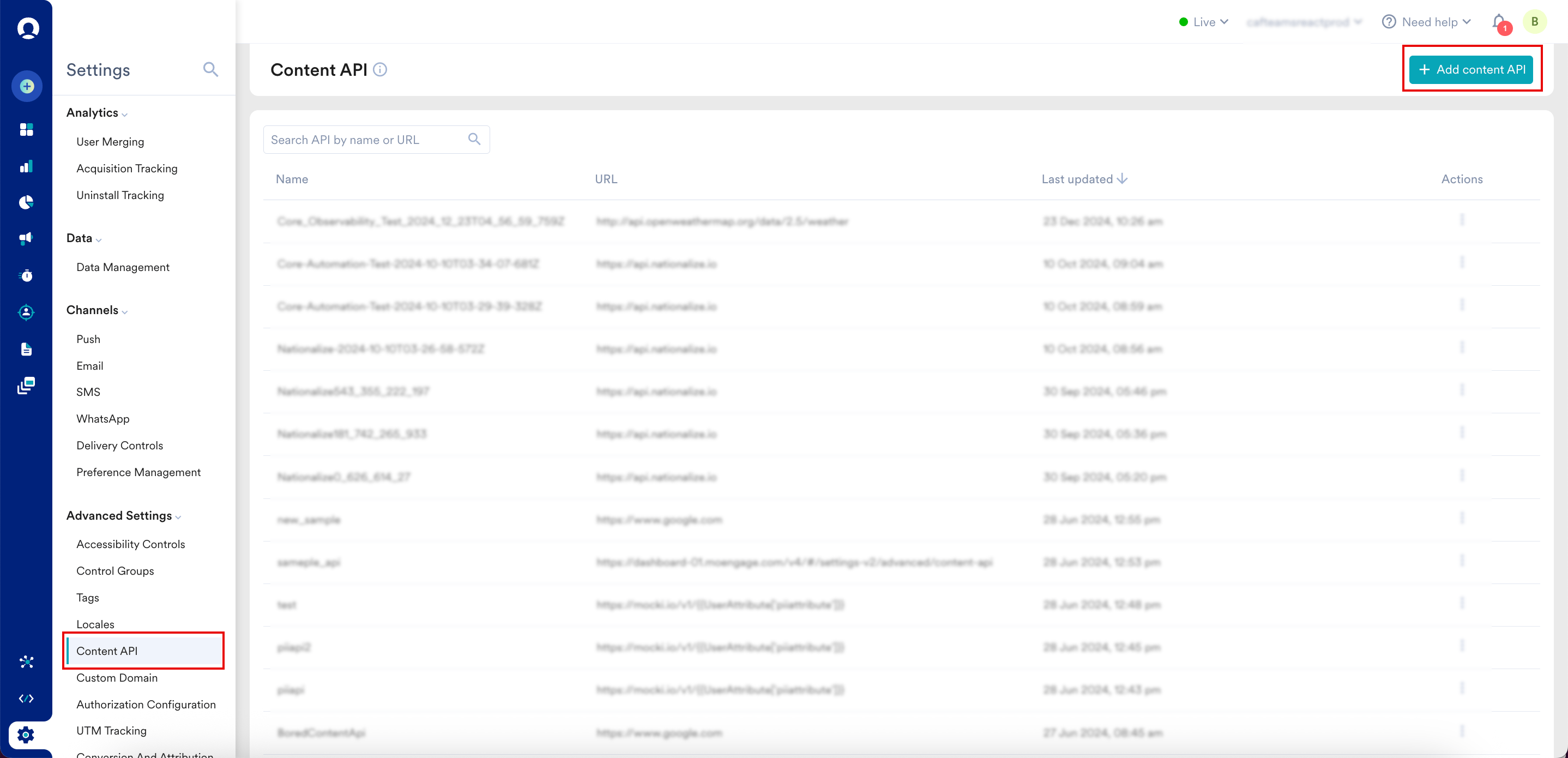
- On the MoEngage UI, navigate to Settings > Advanced settings > Content API.
- Click + Add content API in the upper-right corner. The Add content API dialog box appears.
- Configure the API endpoint URL:
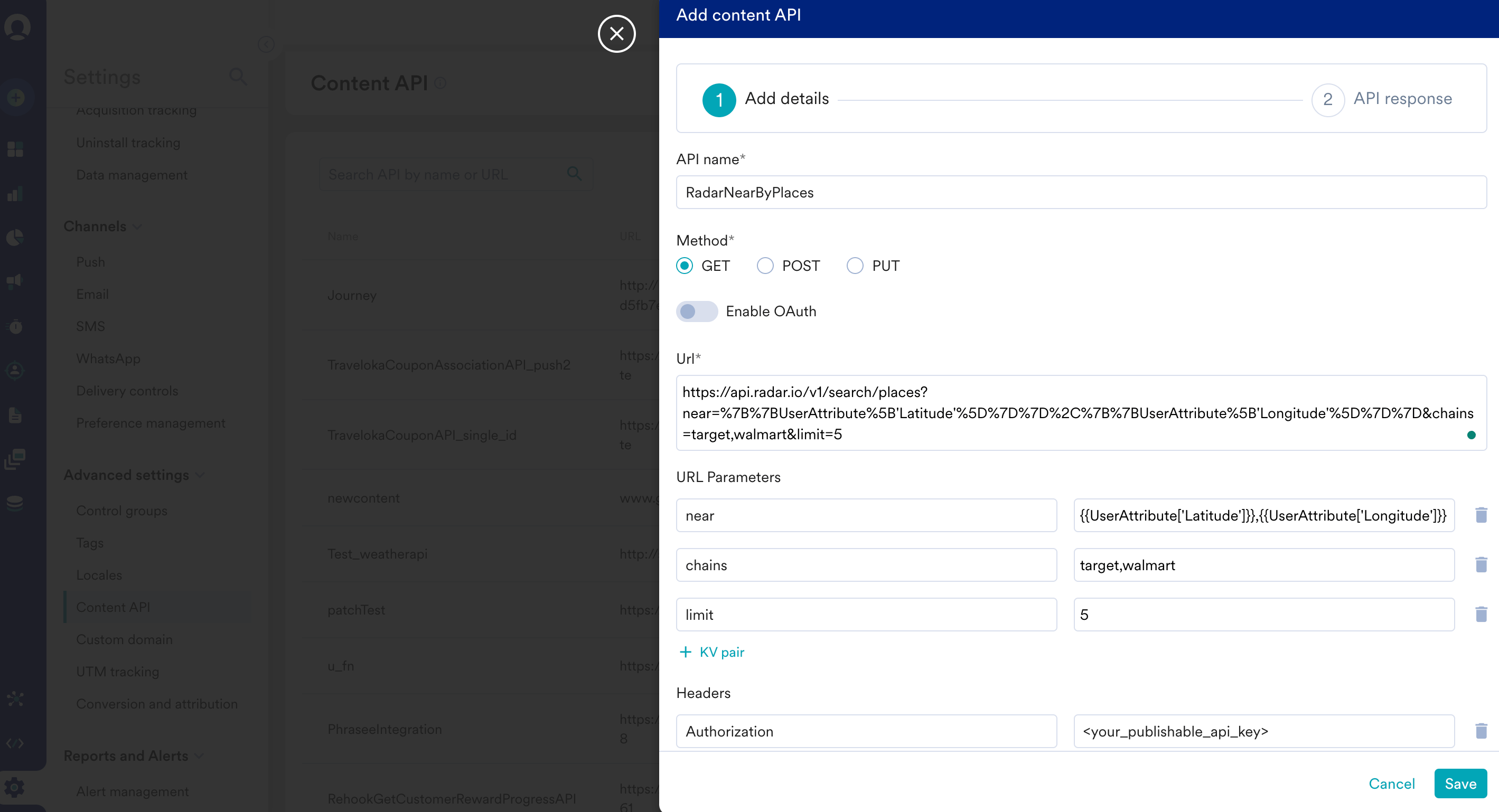
- In the API name box, type a descriptive name for the API (for example,
RadarNearbyPlaces).
- Under Method, select GET.
- In the URL box, paste the Radar Search Places endpoint with the user’s latitude and longitude as parameters:
https://api.radar.io/v1/search/places?near={{UserAttribute['Latitude']}},{{UserAttribute['Longitude']}}&chains=starbucks&limit=5
- In the URL Parameters section, specify your chains.
If your project has a chain mapping, use the mapped ID instead of the chain slug.
- Under Headers, provide the required key-value pair (for example,
Authorization: <your-api-key>).
- Under the Dynamic values section, define keys and their corresponding values.
- Click Save.
For more information about Content APIs, see Content APIs.
Step 2: Display Places Inside MoEngage Campaigns
After setting up the Content API, use it in your campaigns to display nearby places:
- In step 2 of campaign creation, type
@. The Personalization dialog box appears.
- In the Select attribute list, click the Radar Nearby Places Content API you configured in the previous step.
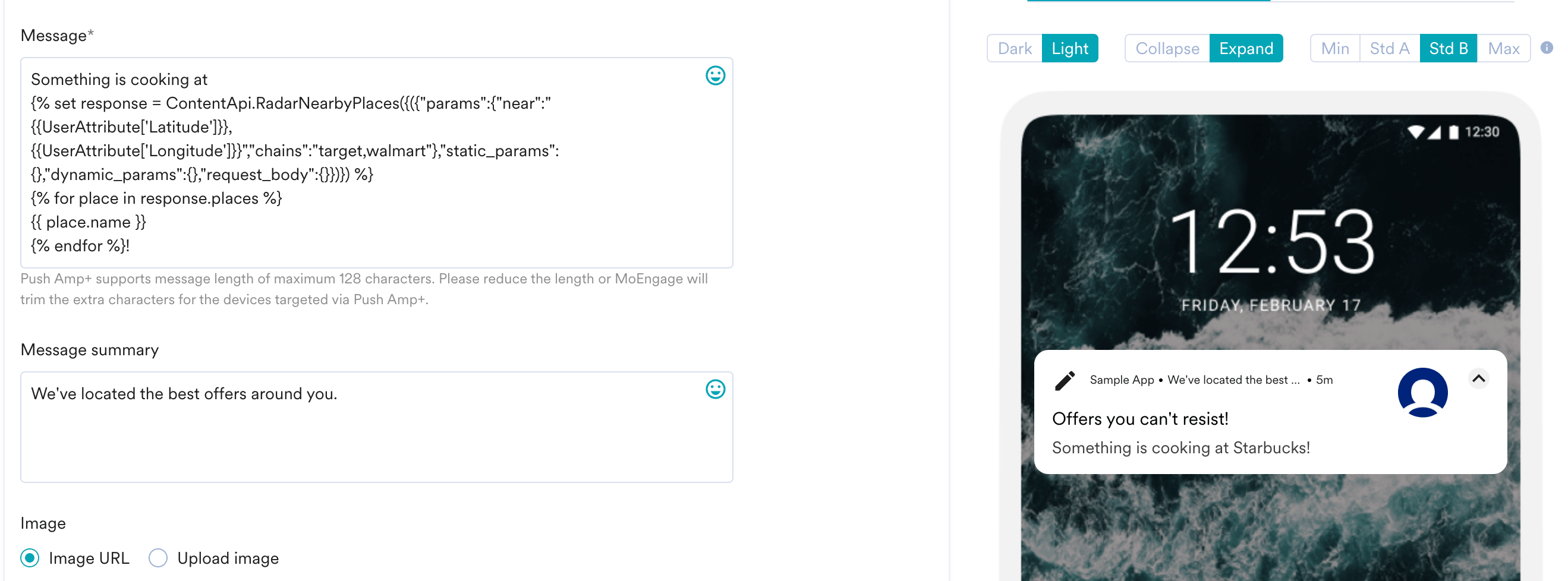
- Use the MoEngage Templating Language to parse the API response and include the content in your campaign. The Jinja snippet below iterates through the list of places and prints their names:
{% set response = ContentApi.RadarNearbyPlaces({"params":{"near":"{{UserAttribute['Latitude']}},{{UserAttribute['Longitude']}}","chains":"target,walmart"},"static_params":{},"dynamic_params":{},"request_body":{}}) %}
{% for place in response.places %}
{{ place.name }}
{% endfor %}
- Click Preview to see your campaign rendered with real-time personalization.