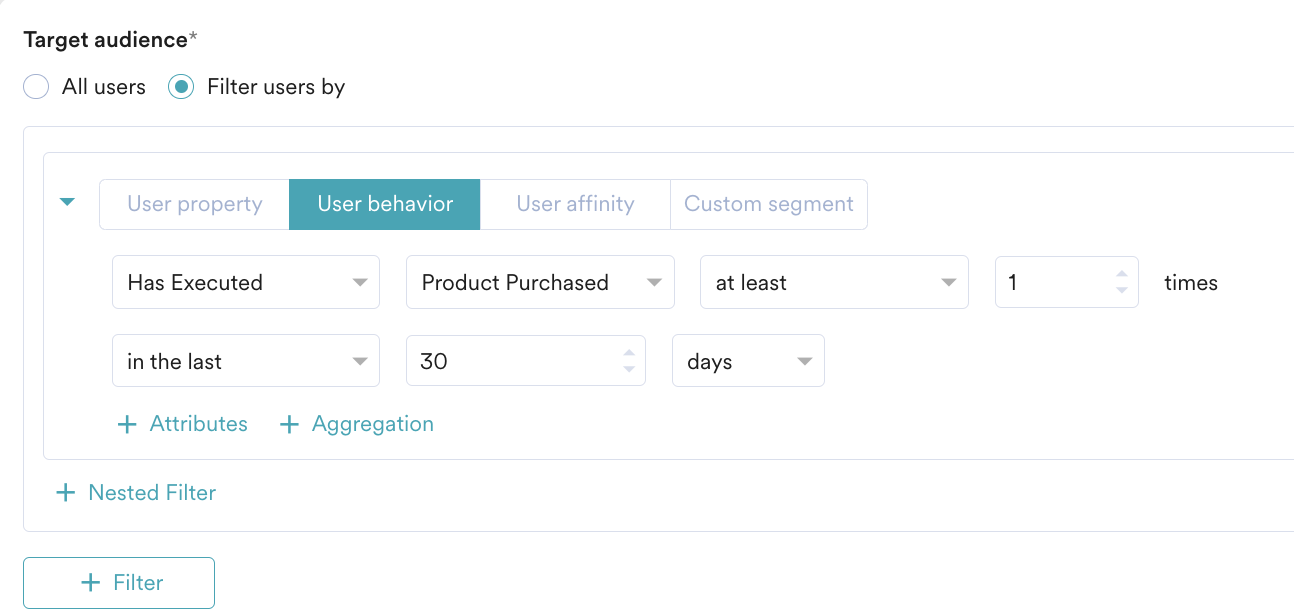
The efforts to acquire new customers should not be nullified by losing customers. The trend goes from customers coming on the website or app to becoming dormant and getting lost. Retaining dormant customers thus plays a crucial role.The users should be engaged by multiple campaigns or offers that help them realize the value of the brand they had intended to be associated with. One of the most effective ways of capturing the attention of the customer is by showcasing the memories they have spent with the brand. These can be either the last video the user watched or the last purchase the user made.In this article, we will create a Catalog, a Recommendation, and a Push campaign to target users based on their past experience, such as users who have made purchases in the last 30 days.
The time range can differ depending on your retention period. If you need a longer retention period of more than 30 days, contact your account manager.
Expected Result
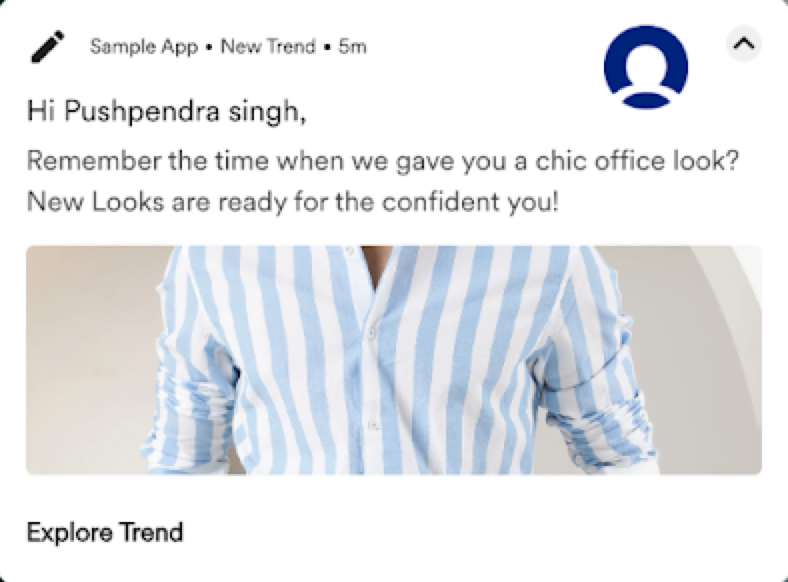
Dormant users receive a Push Notification on their phones:
Recommendations must be enabled and a Catalog must be present.
Events such as item purchased, video played, or book read, and so on, and the respective attributes must be present.
Create a Catalog
In this section, let us create a Catalog:
Go to Content > Catalogs from the left navigation. The Catalogs page is displayed.
Click + Create Catalog. The Create catalog pop-up window is displayed.
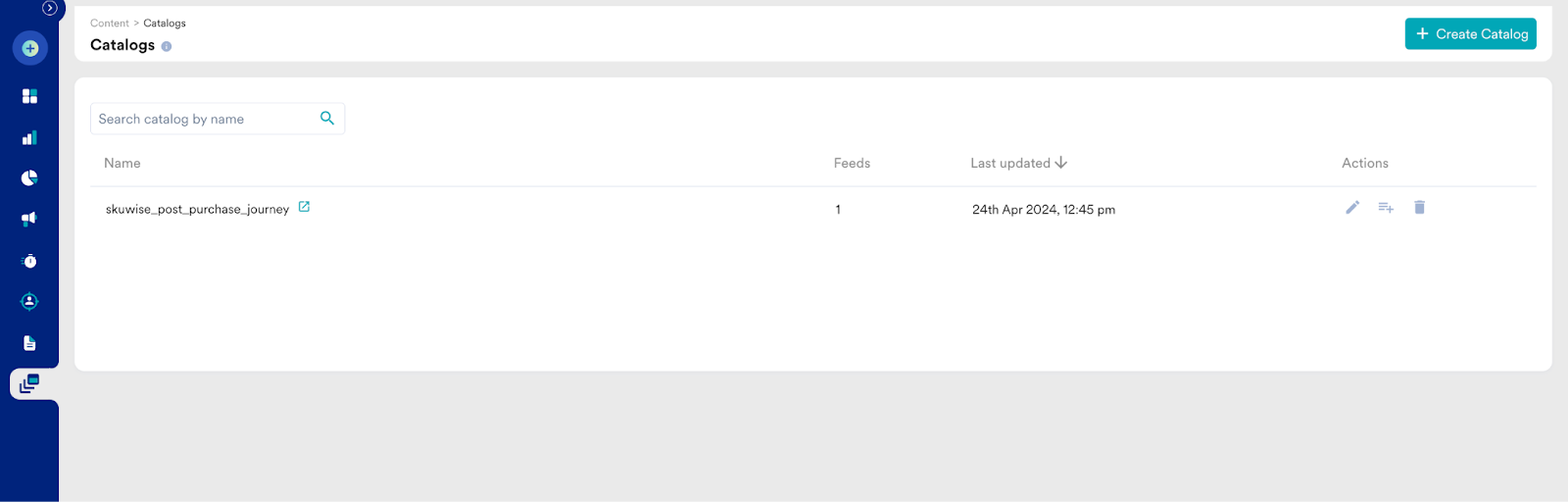
In the Enter catalog name field, enter a name. For example, “skuwise_post_purchase_journey”.
Click Submit. The newly-created catalog is listed on the Catalogs page.
Click the catalog name link or the icon next to it. The Create feed pop-up window is displayed
Upload a catalog with fields such as ID, product image, price, product name, and description. For more information, refer to Catalogs.
Create a Recommendation
In this section, let us map the user action and set the recommendation criteria.
Map the User Action
Go to Content > Recommendations from the left navigation. The Recommendations page is displayed.
Click Map user actions.
Click the event drop-down list under a User Action bucket and choose the relevant action from the drop-down menu.
Set the Recommendation Criteria
Go to Content > Recommendations from the left navigation. The Recommendations page is displayed.
Click + Create recommendation. The Create recommendation page is displayed.
Under Filter by user action and item attributes, click the User Actions model.
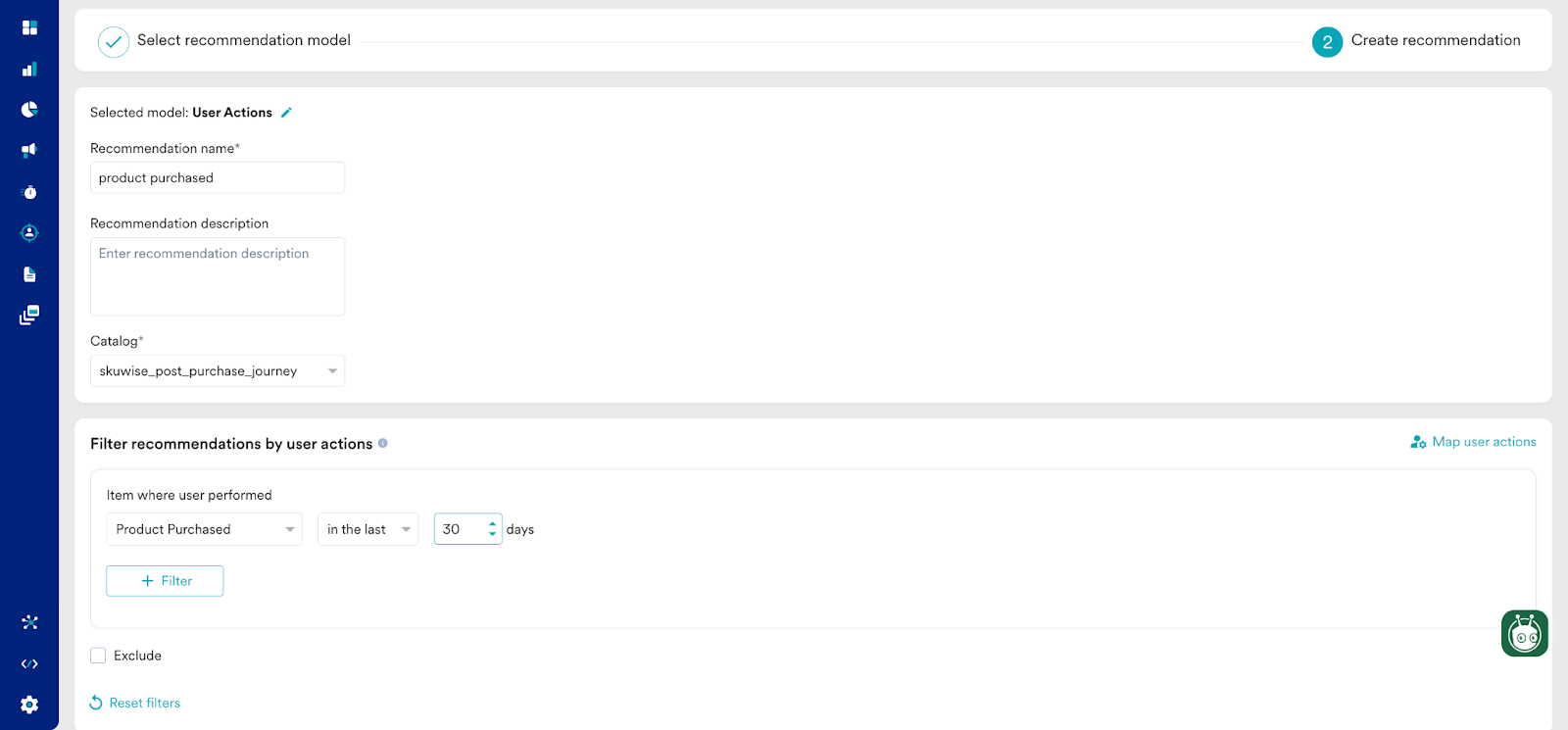
Click Next. It takes you to the second step “Create recommendation”. Enter the following details:
Recommendation name: Enter a name for the recommendation. For example, “product purchased”. This will be the name through which you will refer the output of this recommendation model.
Recommendation description: Enter a description for the recommendation. This description will help you understand what the model is aimed at.
Catalog: Select the “skuwise_post_purchase_journey” catalog.
Click Create to save the changes and run the model.
Create a Push Campaign
In this section, let us create a Push notification for our use case.
Step 1: Target Users
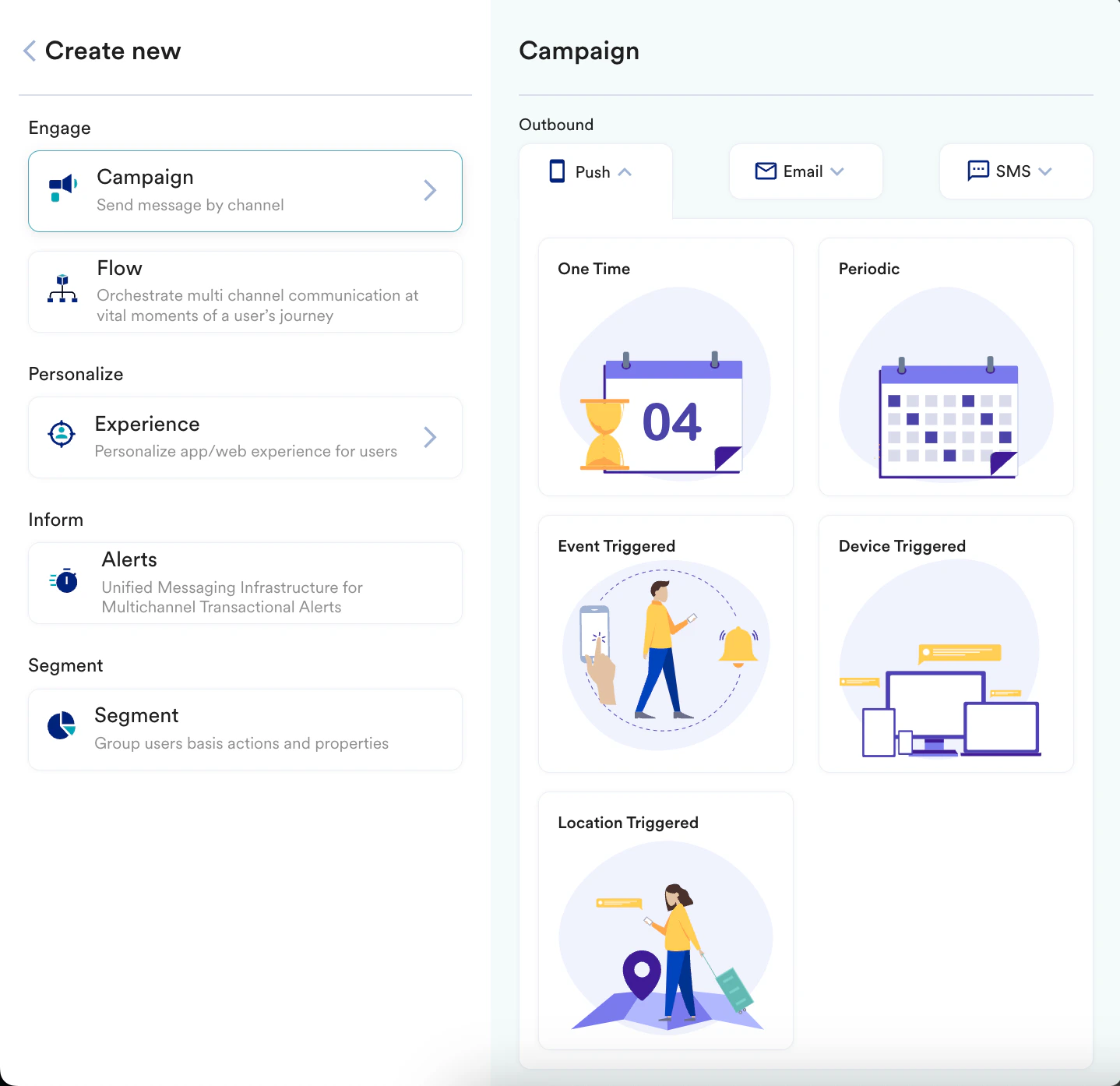
Navigate to the sidebar on the left and click Engage > Campaigns and click + Create campaign or click + Create new > Campaign.
Under Outbound, select Push and then select the delivery type.
You are taken to the first step “Target users” of defining your campaign.
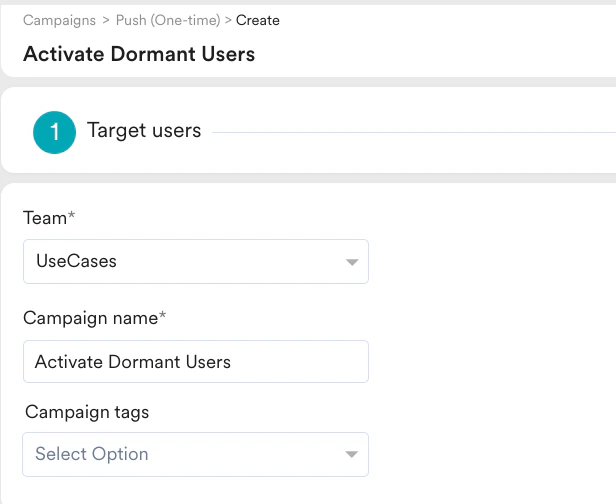
Enter the following details:
Team: Select a team if your organization has teams enabled for your account. For example, “UseCases”. For more information, refer to Teams in MoEngage.
Campaign name: Enter a name for the campaign. For example, “Activate Dormant Users”.
Campaign tags: Select the required campaign tags.
In the Target Audience section, select the target audience as shown in the image below:
In the Target Platforms section, select Android.
Click Next to move to the second step “Content” where you can define the content that will go into your Push campaign.
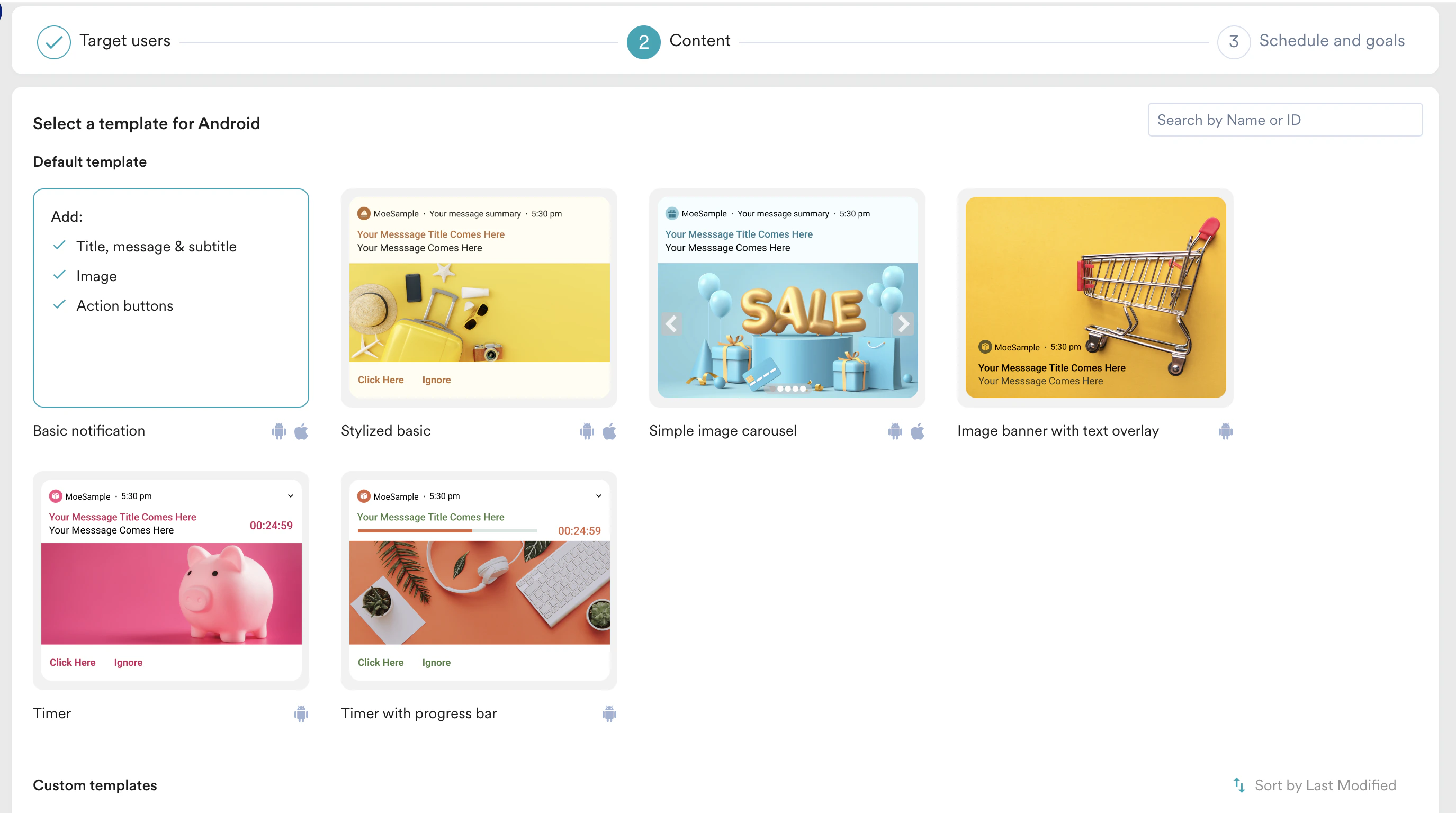
Step 2: Content
Select the template that you like to go with. For our example, select Basic notification.
Enter the required content for the campaign. For example:
Message title
Message
Message summary
Make use of the Catalog to display the memory images.
Carousels work best when there are multiple memories in hand. To set them up, you can use the data to be fetched from the product Catalog and displayed to the user.
Click Next to move to the third step “Schedule and goals” where you can define the schedule and goal of your campaign.
Step 3: Schedule and Goals
In the Send campaign section, define when you want to start and end your campaign.
In the Conversion goals section, add conversion goals that you like to track.
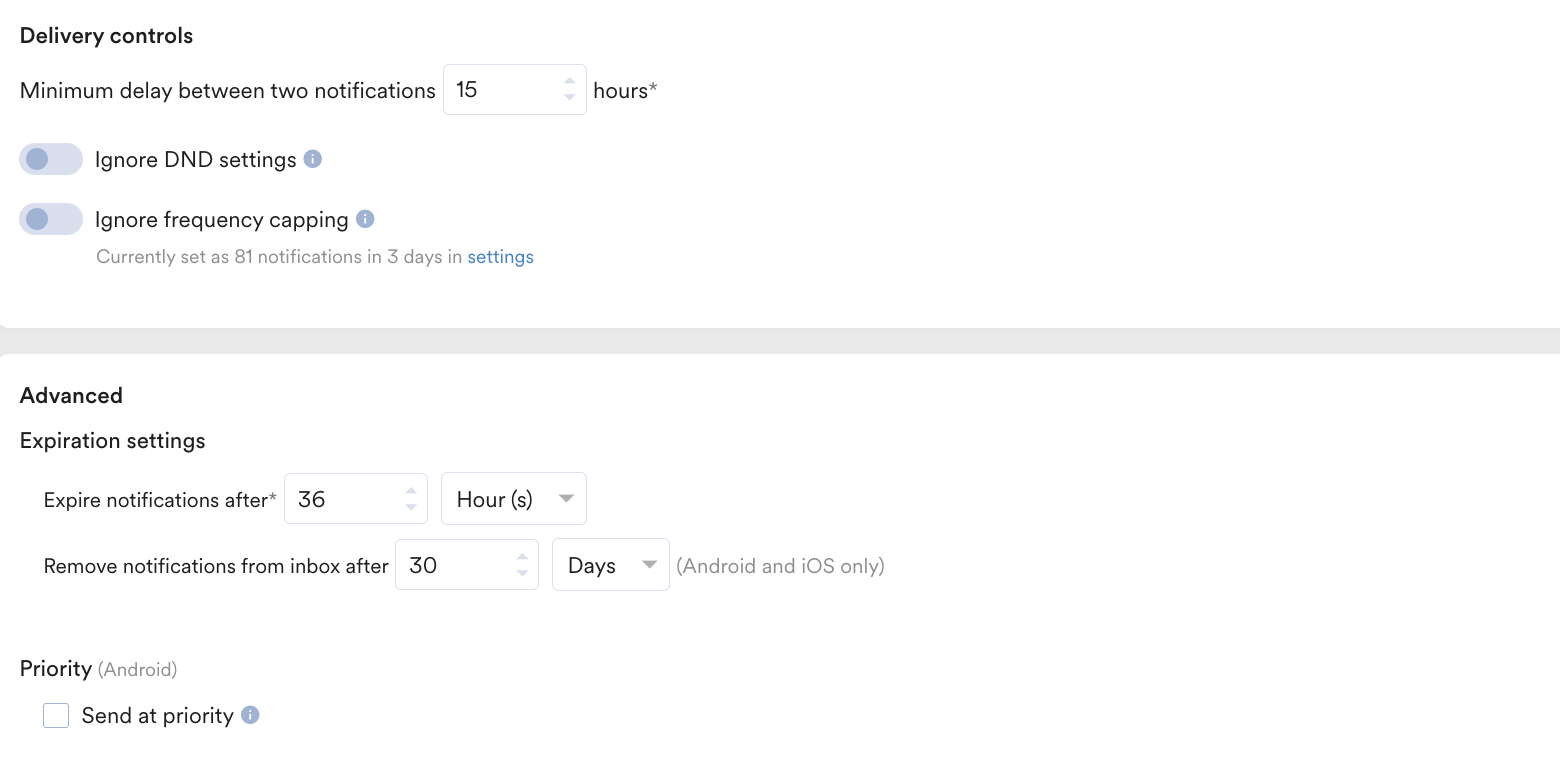
Define Delivery controls and Advanced settings based on your requirements. For more information, refer to Create Push Campaigns.
Click Publish.
Conclusion
In this use case, we created a Catalog, a Recommendation, and a Push campaign to target users using their past experience such as users who have made purchases before 30 days.
{"docsConfig":{"theme":"mint","$schema":"https://mintlify.com/docs.json","name":"MoEngage","colors":{"primary":"#2E69FF","light":"#6691FF","dark":"#2554CC"},"logo":{"light":"https://mintcdn.com/moengage/VG5pJbeZsDUmdCZM/logo/light.svg?fit=max\u0026auto=format\u0026n=VG5pJbeZsDUmdCZM\u0026q=85\u0026s=28ca5909311cb6ffe01738e1503b5e64","dark":"https://mintcdn.com/moengage/VG5pJbeZsDUmdCZM/logo/dark.svg?fit=max\u0026auto=format\u0026n=VG5pJbeZsDUmdCZM\u0026q=85\u0026s=728a767d8fb8d3434575a28de18d08c5","href":"https://www.moengage.com/docs/"},"favicon":"https://mintcdn.com/moengage/bJi_ZHRHKldZCdcW/logo/favicon.svg?fit=max\u0026auto=format\u0026n=bJi_ZHRHKldZCdcW\u0026q=85\u0026s=9d13744d3b616913967983f324947bb5","api":{"examples":{"languages":["curl"]}},"appearance":{"default":"system"},"background":{"decoration":"gradient","color":{"light":"#FFFFFF","dark":"#121212"}},"navbar":{"links":[{"href":"/user-guide/contact-support/raise-a-support-ticket-through-moengage-dashboard","label":"Support"},{"href":"https://www.moengage.com/request-demo","label":"Request Demo"}],"primary":{"type":"button","label":"Dashboard","href":"https://dashboard.moengage.com/"}},"footer":{"socials":{"linkedin":"https://www.linkedin.com/company/moengage","x":"https://x.com/i/flow/login?redirect_after_login=%2Fmoengage","youtube":"https://www.youtube.com/c/MoEngage_Global","facebook":"https://www.facebook.com/moengage","github":"https://github.com/moengage"},"links":[{"header":"Support","items":[{"label":"Contact Support","href":"https://www.moengage.com/docs/user-guide/contact-support/raise-a-support-ticket-through-moengage-dashboard"},{"label":"AIRA Support Bot","href":"https://www.moengage.com/docs/user-guide/contact-support/aira-support-bot/aira-overview"},{"label":"Suggest a Feature","href":"https://www.moengage.com/docs/user-guide/contact-support/suggest-a-feature"},{"label":"System Status","href":"https://status.moengage.com"}]},{"header":"Learn","items":[{"label":"MoEngage Academy","href":"https://academy.moengage.com/student/catalog"},{"label":"Use Cases","href":"https://www.moengage.com/docs/use-cases/introduction"},{"label":"Release Notes","href":"https://www.moengage.com/docs/release-notes/subscribe-to-release-notes"},{"label":"Blog","href":"https://www.moengage.com/blog"}]},{"header":"For AI Tools","items":[{"label":"Setup Guide","href":"https://www.moengage.com/docs/documentation-access-to-agents"},{"label":"llms.txt","href":"https://www.moengage.com/docs/llms.txt"},{"label":"llms-full.txt","href":"https://www.moengage.com/docs/llms-full.txt"}]}]},"seo":{"metatags":{"google-site-verification":"ICNaPDX9oefbF09W1b5_U9PDnlkyfyKSRbIap6_dW6o"},"indexing":"all"},"fonts":{"heading":{"family":"circular","source":"https://app-cdn.moengage.com/images/Fonts/CircularXXWeb-Regular.woff2","format":"woff2"},"body":{"family":"circular","source":"https://app-cdn.moengage.com/images/Fonts/CircularXXWeb-Regular.woff2","format":"woff2"}},"styling":{"eyebrows":"breadcrumbs","latex":true},"contextual":{"options":["copy","view","chatgpt","claude","cursor","vscode"],"display":"header"},"interaction":{"drilldown":true},"navigation":{"languages":[{"language":"en","href":""},{"language":"ja","href":"ja"}]}},"deployment":{"deploymentMetadataValue":{"subdomain":"moengage","hasAudioNarration":false,"actualSubdomain":"moengage","customDomains":["moengage.com"],"gitSource":{"type":"github","owner":"moengage","repo":"moengage-documentation","deployBranch":"main","contentDirectory":"","isPrivate":true,"mountPath":"","label":""},"feedback":{"thumbs":true,"edits":false,"contextualFeedback":{"allowEmail":true},"issues":false,"agentFeedback":true},"entitlements":{"AI_CHAT":{"status":"ENABLED"},"WEB_MCP":{"status":"ENABLED"},"NARRATION":{"status":"ENABLED"}},"buildId":"6af724dbb04360f969d7dd26","clientVersion":"0.0.4143","searchFilterCounts":[{"language":"en","tag":"Guide","count":1187},{"language":"ja","tag":"ガイド","count":1180},{"language":"en","tag":"User Guide","count":798},{"language":"ja","tag":"ユーザーガイド","count":798},{"language":"en","tag":"Campaigns and Channels","count":437},{"language":"ja","tag":"キャンペーンとチャネル","count":437},{"language":"en","tag":"Partner Integrations","count":390},{"language":"ja","tag":"パートナー統合","count":383},{"language":"en","tag":"SDKs","count":341},{"language":"en","tag":"Developer Guide (SDKs)","count":330},{"language":"ja","tag":"SDK","count":308},{"language":"ja","tag":"開発者ガイド(SDK)","count":297},{"language":"en","tag":"Use Cases","count":218},{"language":"ja","tag":"ユースケース","count":218},{"language":"en","tag":"API Guide","count":185},{"language":"ja","tag":"APIガイド","count":183},{"language":"en","tag":"Endpoints","count":179},{"language":"ja","tag":"エンドポイント","count":177},{"language":"en","tag":"Release Notes","count":140},{"language":"ja","tag":"リリースノート","count":136}],"searchSettings":{"maxResults":8,"isFiltersEnabled":true}},"assistantConfig":{"enableStarterQuestions":true,"enableContextualStarterQuestions":true,"deflection":{"enabled":false,"type":"email"}},"basePath":"/docs","hasChatPermissions":true,"hasWebMcpPermissions":true,"toggles":[{"name":"kill-isr","enabled":true,"variant":{"name":"disabled","enabled":false,"feature_enabled":true},"impressionData":false},{"name":"custom-rbac-roles","enabled":true,"variant":{"name":"disabled","enabled":false,"feature_enabled":true},"impressionData":false},{"name":"agent-mintlify-slack","enabled":true,"variant":{"name":"disabled","enabled":false,"feature_enabled":true},"impressionData":false},{"name":"agent-integrations-settings","enabled":true,"variant":{"name":"disabled","enabled":false,"feature_enabled":true},"impressionData":false},{"name":"rbac-expansion","enabled":true,"variant":{"name":"disabled","enabled":false,"feature_enabled":true},"impressionData":false},{"name":"automations-pr-grouping","enabled":true,"variant":{"name":"disabled","enabled":false,"feature_enabled":true},"impressionData":false},{"name":"custom-prefix","enabled":true,"variant":{"name":"disabled","enabled":false,"feature_enabled":true},"impressionData":false},{"name":"analytics-v7","enabled":true,"variant":{"name":"disabled","enabled":false,"feature_enabled":true},"impressionData":false},{"name":"user-flows-analytics","enabled":true,"variant":{"name":"disabled","enabled":false,"feature_enabled":true},"impressionData":false},{"name":"no-publish-flow","enabled":true,"variant":{"name":"disabled","enabled":false,"feature_enabled":true},"impressionData":false},{"name":"workos-onboarding","enabled":true,"variant":{"name":"disabled","enabled":false,"feature_enabled":true},"impressionData":false},{"name":"snapshot-serving-live","enabled":true,"variant":{"name":"disabled","enabled":false,"feature_enabled":true},"impressionData":false},{"name":"stripTemperatureMiddleware","enabled":true,"variant":{"name":"disabled","enabled":false,"feature_enabled":true},"impressionData":false},{"name":"support-platform-pylon-zendesk","enabled":true,"variant":{"name":"disabled","enabled":false,"feature_enabled":true},"impressionData":false},{"name":"snapshot-serving","enabled":true,"variant":{"name":"disabled","enabled":false,"feature_enabled":true},"impressionData":false},{"name":"instant-rollback","enabled":true,"variant":{"name":"disabled","enabled":false,"feature_enabled":true},"impressionData":false},{"name":"granular-notifications-server","enabled":true,"variant":{"name":"disabled","enabled":false,"feature_enabled":true},"impressionData":false},{"name":"granular-notifications","enabled":true,"variant":{"name":"disabled","enabled":false,"feature_enabled":true},"impressionData":false},{"name":"automations-fable","enabled":true,"variant":{"name":"disabled","enabled":false,"feature_enabled":true},"impressionData":false},{"name":"fixed-ai-action-pricing","enabled":true,"variant":{"name":"disabled","enabled":false,"feature_enabled":true},"impressionData":false},{"name":"automation-resolve-merge-conflict","enabled":true,"variant":{"name":"disabled","enabled":false,"feature_enabled":true},"impressionData":false},{"name":"scoped-publishing","enabled":true,"variant":{"name":"disabled","enabled":false,"feature_enabled":true},"impressionData":false},{"name":"mintql","enabled":true,"variant":{"name":"disabled","enabled":false,"feature_enabled":true},"impressionData":false},{"name":"page-level-analytics","enabled":true,"variant":{"name":"disabled","enabled":false,"feature_enabled":true},"impressionData":false},{"name":"editor-version-history-v2","enabled":true,"variant":{"name":"disabled","enabled":false,"feature_enabled":true},"impressionData":false},{"name":"billing-page-v2","enabled":true,"variant":{"name":"disabled","enabled":false,"feature_enabled":true},"impressionData":false},{"name":"full-page-search","enabled":true,"variant":{"name":"disabled","enabled":false,"feature_enabled":true},"impressionData":false},{"name":"workspace-projects","enabled":true,"variant":{"name":"disabled","enabled":false,"feature_enabled":true},"impressionData":false},{"name":"assistant-v5","enabled":true,"variant":{"name":"disabled","enabled":false,"feature_enabled":true},"impressionData":false},{"name":"fork-pr-previews","enabled":true,"variant":{"name":"disabled","enabled":false,"feature_enabled":true},"impressionData":false},{"name":"revalidation-jwt","enabled":true,"variant":{"name":"disabled","enabled":false,"feature_enabled":true},"impressionData":false},{"name":"workos-sso-scim","enabled":true,"variant":{"name":"disabled","enabled":false,"feature_enabled":true},"impressionData":false},{"name":"hobby-abuse-scan","enabled":true,"variant":{"name":"disabled","enabled":false,"feature_enabled":true},"impressionData":false},{"name":"dashboard-inbox","enabled":true,"variant":{"name":"disabled","enabled":false,"feature_enabled":true},"impressionData":false},{"name":"workos-signup","enabled":true,"variant":{"name":"disabled","enabled":false,"feature_enabled":true},"impressionData":false},{"name":"turbopuffer-dual-write","enabled":true,"variant":{"name":"disabled","enabled":false,"feature_enabled":true},"impressionData":false},{"name":"workos-enabled","enabled":true,"variant":{"name":"disabled","enabled":false,"feature_enabled":true},"impressionData":false},{"name":"approve-review-flow","enabled":true,"variant":{"name":"disabled","enabled":false,"feature_enabled":true},"impressionData":false},{"name":"editor-metadata","enabled":true,"variant":{"name":"disabled","enabled":false,"feature_enabled":true},"impressionData":false},{"name":"sso-setup-deadline-banner","enabled":true,"variant":{"name":"disabled","enabled":false,"feature_enabled":true},"impressionData":false},{"name":"turbopuffer-serve","enabled":true,"variant":{"name":"disabled","enabled":false,"feature_enabled":true},"impressionData":false},{"name":"live-agents","enabled":true,"variant":{"name":"disabled","enabled":false,"feature_enabled":true},"impressionData":false},{"name":"llms-txt-v2","enabled":true,"variant":{"name":"disabled","enabled":false,"feature_enabled":true},"impressionData":false}],"starterQuestions":[{"_id":"69a03c84f0b21f38ae93fdfb","deploymentId":"68bea8f8fe02728a34cf2acf","questionText":"How do I track user events?","status":"active","generatedBy":"manual","createdAt":"2026-02-26T12:28:52.454Z","updatedAt":"2026-02-26T12:28:52.454Z","__v":0}],"privacy":{"consentBanner":{"enabled":true}},"googleFontsInlined":false},"customCss":[{"filePath":"style.css","href":"/docs/_mintlify/custom/moengage/0a209f0cf9e21c6c/style.css"}],"page":{"pagePath":"use-cases/catalogs/how-to-activate-dormant-users-with-memories","slug":"/use-cases/catalogs/how-to-activate-dormant-users-with-memories","pageMetadata":{"title":"How to Activate Dormant Users with Memories","description":null,"href":"/use-cases/catalogs/how-to-activate-dormant-users-with-memories"},"pageType":"default","mdx":{"mdxSource":{"compiledSource":"\"use strict\";const{Fragment:_Fragment,jsx:_jsx,jsxs:_jsxs}=arguments[0];const{useMDXComponents:_provideComponents}=arguments[0];function _createMdxContent(props){const _components={a:`a`,li:`li`,ol:`ol`,p:`p`,strong:`strong`,ul:`ul`,..._provideComponents(),...props.components},{Heading,Info,OptimizedImage,Tip}=_components;if(!Heading)_missingMdxReference(`Heading`,true);if(!Info)_missingMdxReference(`Info`,true);if(!OptimizedImage)_missingMdxReference(`OptimizedImage`,true);if(!Tip)_missingMdxReference(`Tip`,true);return _jsxs(_Fragment,{children:[_jsx(Heading,{level:`1`,id:`introduction`,children:`Introduction`}),`\n`,_jsx(_components.p,{children:`The efforts to acquire new customers should not be nullified by losing customers. The trend goes from customers coming on the website or app to becoming dormant and getting lost. Retaining dormant customers thus plays a crucial role.`}),`\n`,_jsx(_components.p,{children:`The users should be engaged by multiple campaigns or offers that help them realize the value of the brand they had intended to be associated with. One of the most effective ways of capturing the attention of the customer is by showcasing the memories they have spent with the brand. These can be either the last video the user watched or the last purchase the user made.`}),`\n`,_jsx(_components.p,{children:`In this article, we will create a Catalog, a Recommendation, and a Push campaign to target users based on their past experience, such as users who have made purchases in the last 30 days.`}),`\n`,_jsx(Tip,{children:_jsx(_components.p,{children:`The time range can differ depending on your retention period. If you need a longer retention period of more than 30 days, contact your account manager.`})}),`\n`,_jsx(Heading,{level:`1`,id:`expected-result`,children:`Expected Result`}),`\n`,_jsx(_components.p,{children:`Dormant users receive a Push Notification on their phones:`}),`\n`,_jsx(OptimizedImage,{alt:`1.png`,src:`https://mintcdn.com/moengage/2kQqTYC5RUPSd8kI/images/moengage_3f20e4.png?fit=max\u0026auto=format\u0026n=2kQqTYC5RUPSd8kI\u0026q=85\u0026s=53853549933c26762382bfcc808a0c86`,style:{width:`67%`},\"data-og-width\":`788`,width:`788`,\"data-og-height\":`582`,height:`582`,\"data-path\":`images/moengage_3f20e4.png`,\"data-optimize\":`true`,\"data-opv\":`3`,srcset:`https://mintcdn.com/moengage/2kQqTYC5RUPSd8kI/images/moengage_3f20e4.png?w=280\u0026fit=max\u0026auto=format\u0026n=2kQqTYC5RUPSd8kI\u0026q=85\u0026s=42987afa17eb0408874f591dd1ffe601 280w, https://mintcdn.com/moengage/2kQqTYC5RUPSd8kI/images/moengage_3f20e4.png?w=560\u0026fit=max\u0026auto=format\u0026n=2kQqTYC5RUPSd8kI\u0026q=85\u0026s=86b238701efd015261d16fdfe4fd0770 560w, https://mintcdn.com/moengage/2kQqTYC5RUPSd8kI/images/moengage_3f20e4.png?w=840\u0026fit=max\u0026auto=format\u0026n=2kQqTYC5RUPSd8kI\u0026q=85\u0026s=2eea68ba94ac4c2911ffcd419f809f39 840w, https://mintcdn.com/moengage/2kQqTYC5RUPSd8kI/images/moengage_3f20e4.png?w=1100\u0026fit=max\u0026auto=format\u0026n=2kQqTYC5RUPSd8kI\u0026q=85\u0026s=cb1f944b99f05436d5a9b426892972db 1100w, https://mintcdn.com/moengage/2kQqTYC5RUPSd8kI/images/moengage_3f20e4.png?w=1650\u0026fit=max\u0026auto=format\u0026n=2kQqTYC5RUPSd8kI\u0026q=85\u0026s=93c21080bee8e3475c3a19c859e55ad4 1650w, https://mintcdn.com/moengage/2kQqTYC5RUPSd8kI/images/moengage_3f20e4.png?w=2500\u0026fit=max\u0026auto=format\u0026n=2kQqTYC5RUPSd8kI\u0026q=85\u0026s=daf3bf2279a96f5dc5407273e7c06921 2500w`}),`\n`,_jsx(Tip,{children:_jsxs(_components.ul,{children:[`\n`,_jsx(_components.li,{children:`Recommendations must be enabled and a Catalog must be present.`}),`\n`,_jsx(_components.li,{children:`Events such as item purchased, video played, or book read, and so on, and the respective attributes must be present.`}),`\n`]})}),`\n`,_jsx(Heading,{level:`1`,id:`create-a-catalog`,children:`Create a Catalog`}),`\n`,_jsx(_components.p,{children:`In this section, let us create a Catalog:`}),`\n`,_jsxs(_components.ol,{children:[`\n`,_jsxs(_components.li,{children:[`Go to `,_jsx(_components.strong,{children:`Content`}),` > `,_jsx(_components.strong,{children:`Catalogs`}),` from the left navigation. The Catalogs page is displayed.`]}),`\n`,_jsxs(_components.li,{children:[`Click `,_jsx(_components.strong,{children:`+ Create Catalog`}),`. The Create catalog pop-up window is displayed.`]}),`\n`,_jsxs(_components.li,{children:[`In the `,_jsx(_components.strong,{children:`Enter catalog name`}),` field, enter a name. For example, “skuwise_post_purchase_journey”.`]}),`\n`,_jsxs(_components.li,{children:[`Click `,_jsx(_components.strong,{children:`Submit`}),`. The newly-created catalog is listed on the Catalogs page.`,`\n`,_jsx(OptimizedImage,{src:`https://mintcdn.com/moengage/cVruC-B7I1TnIZ0h/images/moengage_d8f4cf.png?fit=max\u0026auto=format\u0026n=cVruC-B7I1TnIZ0h\u0026q=85\u0026s=63e64a994fafcf0d08085cbdad4383fd`,alt:`create catalogs.png`,\"data-og-width\":`1600`,width:`1600`,\"data-og-height\":`512`,height:`512`,\"data-path\":`images/moengage_d8f4cf.png`,\"data-optimize\":`true`,\"data-opv\":`3`,srcset:`https://mintcdn.com/moengage/cVruC-B7I1TnIZ0h/images/moengage_d8f4cf.png?w=280\u0026fit=max\u0026auto=format\u0026n=cVruC-B7I1TnIZ0h\u0026q=85\u0026s=2156d1af8c1a9dd0f755c173398099e5 280w, https://mintcdn.com/moengage/cVruC-B7I1TnIZ0h/images/moengage_d8f4cf.png?w=560\u0026fit=max\u0026auto=format\u0026n=cVruC-B7I1TnIZ0h\u0026q=85\u0026s=1d4a7d3963aa5ce93a8768b350f2f2ee 560w, https://mintcdn.com/moengage/cVruC-B7I1TnIZ0h/images/moengage_d8f4cf.png?w=840\u0026fit=max\u0026auto=format\u0026n=cVruC-B7I1TnIZ0h\u0026q=85\u0026s=990d1ebc20d16b24bd36a20762ea4786 840w, https://mintcdn.com/moengage/cVruC-B7I1TnIZ0h/images/moengage_d8f4cf.png?w=1100\u0026fit=max\u0026auto=format\u0026n=cVruC-B7I1TnIZ0h\u0026q=85\u0026s=31b6dce1c8bf3b3d4e0b3323551b0bea 1100w, https://mintcdn.com/moengage/cVruC-B7I1TnIZ0h/images/moengage_d8f4cf.png?w=1650\u0026fit=max\u0026auto=format\u0026n=cVruC-B7I1TnIZ0h\u0026q=85\u0026s=d72c610abac3dfb65f88ea8810cc2520 1650w, https://mintcdn.com/moengage/cVruC-B7I1TnIZ0h/images/moengage_d8f4cf.png?w=2500\u0026fit=max\u0026auto=format\u0026n=cVruC-B7I1TnIZ0h\u0026q=85\u0026s=3184cbfb1c57c21303104f9f7041c71e 2500w`}),`\n`]}),`\n`,_jsx(_components.li,{children:`Click the catalog name link or the icon next to it. The Create feed pop-up window is displayed`}),`\n`,_jsxs(_components.li,{children:[`Upload a catalog with fields such as ID, product image, price, product name, and description. For more information, refer to `,_jsx(_components.a,{href:`/user-guide/content/recommendations/prerequisites/catalogs`,children:`Catalogs`}),`.`]}),`\n`]}),`\n`,_jsx(Heading,{level:`1`,id:`create-a-recommendation`,children:`Create a Recommendation`}),`\n`,_jsx(_components.p,{children:`In this section, let us map the user action and set the recommendation criteria.`}),`\n`,_jsx(Heading,{level:`2`,id:`map-the-user-action`,children:`Map the User Action`}),`\n`,_jsxs(_components.ol,{children:[`\n`,_jsxs(_components.li,{children:[`Go to `,_jsx(_components.strong,{children:`Content`}),` > `,_jsx(_components.strong,{children:`Recommendations`}),` from the left navigation. The Recommendations page is displayed.`]}),`\n`,_jsxs(_components.li,{children:[`Click `,_jsx(_components.strong,{children:`Map user actions`}),`.`]}),`\n`,_jsxs(_components.li,{children:[`Click the event drop-down list under a User Action bucket and choose the relevant action from the drop-down menu.`,`\n`,_jsx(OptimizedImage,{src:`https://mintcdn.com/moengage/rmgWdhG7TCISpEIz/images/moengage_d3ade6.png?fit=max\u0026auto=format\u0026n=rmgWdhG7TCISpEIz\u0026q=85\u0026s=5a540c39c193d1a364fe168d35dc5b0f`,alt:`cat 2.png`,\"data-og-width\":`1600`,width:`1600`,\"data-og-height\":`223`,height:`223`,\"data-path\":`images/moengage_d3ade6.png`,\"data-optimize\":`true`,\"data-opv\":`3`,srcset:`https://mintcdn.com/moengage/rmgWdhG7TCISpEIz/images/moengage_d3ade6.png?w=280\u0026fit=max\u0026auto=format\u0026n=rmgWdhG7TCISpEIz\u0026q=85\u0026s=c0bd999a2d1855b5d72a9e2fcf57e510 280w, https://mintcdn.com/moengage/rmgWdhG7TCISpEIz/images/moengage_d3ade6.png?w=560\u0026fit=max\u0026auto=format\u0026n=rmgWdhG7TCISpEIz\u0026q=85\u0026s=a58a740b5f2a7447aab5bf8705299df0 560w, https://mintcdn.com/moengage/rmgWdhG7TCISpEIz/images/moengage_d3ade6.png?w=840\u0026fit=max\u0026auto=format\u0026n=rmgWdhG7TCISpEIz\u0026q=85\u0026s=38eebc959457848c8a55629681b8fbc6 840w, https://mintcdn.com/moengage/rmgWdhG7TCISpEIz/images/moengage_d3ade6.png?w=1100\u0026fit=max\u0026auto=format\u0026n=rmgWdhG7TCISpEIz\u0026q=85\u0026s=42bafaba89881fce5637c54b5aa7a183 1100w, https://mintcdn.com/moengage/rmgWdhG7TCISpEIz/images/moengage_d3ade6.png?w=1650\u0026fit=max\u0026auto=format\u0026n=rmgWdhG7TCISpEIz\u0026q=85\u0026s=3d996f23254492baf9180925b4f0cd5c 1650w, https://mintcdn.com/moengage/rmgWdhG7TCISpEIz/images/moengage_d3ade6.png?w=2500\u0026fit=max\u0026auto=format\u0026n=rmgWdhG7TCISpEIz\u0026q=85\u0026s=490209b16404390d7d02219c5568b6e5 2500w`}),`\n`]}),`\n`]}),`\n`,_jsx(Heading,{level:`2`,id:`set-the-recommendation-criteria`,children:`Set the Recommendation Criteria`}),`\n`,_jsxs(_components.ol,{children:[`\n`,_jsxs(_components.li,{children:[`Go to `,_jsx(_components.strong,{children:`Content`}),` > `,_jsx(_components.strong,{children:`Recommendations`}),` from the left navigation. The Recommendations page is displayed.`]}),`\n`,_jsxs(_components.li,{children:[`Click `,_jsx(_components.strong,{children:`+ Create recommendation`}),`. The Create recommendation page is displayed.`]}),`\n`,_jsxs(_components.li,{children:[`Under `,_jsx(_components.strong,{children:`Filter by user action and item attributes`}),`, click the `,_jsx(_components.strong,{children:`User Actions`}),` model.`]}),`\n`,_jsxs(_components.li,{children:[`Click `,_jsx(_components.strong,{children:`Next`}),`. It takes you to the second step “Create recommendation”. Enter the following details:`,`\n`,_jsxs(_components.ul,{children:[`\n`,_jsxs(_components.li,{children:[_jsx(_components.strong,{children:`Recommendation name`}),`: Enter a name for the recommendation. For example, “product purchased”. This will be the name through which you will refer the output of this recommendation model.`]}),`\n`,_jsxs(_components.li,{children:[_jsx(_components.strong,{children:`Recommendation description`}),`: Enter a description for the recommendation. This description will help you understand what the model is aimed at.`]}),`\n`,_jsxs(_components.li,{children:[_jsx(_components.strong,{children:`Catalog`}),`: Select the “skuwise_post_purchase_journey” catalog.`,`\n`,_jsx(OptimizedImage,{src:`https://mintcdn.com/moengage/_fazdN5K6hQMBuV9/images/moengage_3c76ca.png?fit=max\u0026auto=format\u0026n=_fazdN5K6hQMBuV9\u0026q=85\u0026s=396ad10172e9ee514763f0f8f81f039c`,alt:`cat3.png`,\"data-og-width\":`1600`,width:`1600`,\"data-og-height\":`745`,height:`745`,\"data-path\":`images/moengage_3c76ca.png`,\"data-optimize\":`true`,\"data-opv\":`3`,srcset:`https://mintcdn.com/moengage/_fazdN5K6hQMBuV9/images/moengage_3c76ca.png?w=280\u0026fit=max\u0026auto=format\u0026n=_fazdN5K6hQMBuV9\u0026q=85\u0026s=0aaed4cb4307e771e095614f0e379739 280w, https://mintcdn.com/moengage/_fazdN5K6hQMBuV9/images/moengage_3c76ca.png?w=560\u0026fit=max\u0026auto=format\u0026n=_fazdN5K6hQMBuV9\u0026q=85\u0026s=76c4c424ea14fce8768d5609ba62aa6a 560w, https://mintcdn.com/moengage/_fazdN5K6hQMBuV9/images/moengage_3c76ca.png?w=840\u0026fit=max\u0026auto=format\u0026n=_fazdN5K6hQMBuV9\u0026q=85\u0026s=76c8dfe02e3c60f8d25110796e7d509d 840w, https://mintcdn.com/moengage/_fazdN5K6hQMBuV9/images/moengage_3c76ca.png?w=1100\u0026fit=max\u0026auto=format\u0026n=_fazdN5K6hQMBuV9\u0026q=85\u0026s=5ceddf8937966c2ffdf7023834547f38 1100w, https://mintcdn.com/moengage/_fazdN5K6hQMBuV9/images/moengage_3c76ca.png?w=1650\u0026fit=max\u0026auto=format\u0026n=_fazdN5K6hQMBuV9\u0026q=85\u0026s=1486bf88446f183d737cfc1676cd0ca0 1650w, https://mintcdn.com/moengage/_fazdN5K6hQMBuV9/images/moengage_3c76ca.png?w=2500\u0026fit=max\u0026auto=format\u0026n=_fazdN5K6hQMBuV9\u0026q=85\u0026s=56f050c81ad5ceb9e5bb1524bbf5b6a5 2500w`}),`\n`]}),`\n`]}),`\n`]}),`\n`,_jsxs(_components.li,{children:[`Click `,_jsx(_components.strong,{children:`Create`}),` to save the changes and run the model.`]}),`\n`]}),`\n`,_jsx(Heading,{level:`1`,id:`create-a-push-campaign`,children:`Create a Push Campaign`}),`\n`,_jsx(_components.p,{children:`In this section, let us create a Push notification for our use case.`}),`\n`,_jsx(Heading,{level:`2`,id:`step-1-target-users`,children:`Step 1: Target Users`}),`\n`,_jsxs(_components.ol,{children:[`\n`,_jsxs(_components.li,{children:[`Navigate to the sidebar on the left and click `,_jsx(_components.strong,{children:`Engage`}),` > `,_jsx(_components.strong,{children:`Campaigns`}),` and click `,_jsx(_components.strong,{children:`+ Create campaign`}),` or click `,_jsx(_components.strong,{children:`+ Create new`}),` > `,_jsx(_components.strong,{children:`Campaign`}),`.`]}),`\n`,_jsxs(_components.li,{children:[`Under `,_jsx(_components.strong,{children:`Outbound`}),`, select `,_jsx(_components.strong,{children:`Push`}),` and then select the delivery type.`,`\n`,_jsx(OptimizedImage,{src:`https://mintcdn.com/moengage/SBG7um9Fqotw1CFo/images/moengage_b4cc38.png?fit=max\u0026auto=format\u0026n=SBG7um9Fqotw1CFo\u0026q=85\u0026s=39796d7d69021dc7ba5b904fe85a33ad`,alt:`5.png`,\"data-og-width\":`1438`,width:`1438`,\"data-og-height\":`1394`,height:`1394`,\"data-path\":`images/moengage_b4cc38.png`,\"data-optimize\":`true`,\"data-opv\":`3`,srcset:`https://mintcdn.com/moengage/SBG7um9Fqotw1CFo/images/moengage_b4cc38.png?w=280\u0026fit=max\u0026auto=format\u0026n=SBG7um9Fqotw1CFo\u0026q=85\u0026s=7a7d4433295d023af3b23303691da915 280w, https://mintcdn.com/moengage/SBG7um9Fqotw1CFo/images/moengage_b4cc38.png?w=560\u0026fit=max\u0026auto=format\u0026n=SBG7um9Fqotw1CFo\u0026q=85\u0026s=97080795d7a6c9f965b3ba4bec55693e 560w, https://mintcdn.com/moengage/SBG7um9Fqotw1CFo/images/moengage_b4cc38.png?w=840\u0026fit=max\u0026auto=format\u0026n=SBG7um9Fqotw1CFo\u0026q=85\u0026s=f64ec679ed0143940ce2d5a1fbb53480 840w, https://mintcdn.com/moengage/SBG7um9Fqotw1CFo/images/moengage_b4cc38.png?w=1100\u0026fit=max\u0026auto=format\u0026n=SBG7um9Fqotw1CFo\u0026q=85\u0026s=76f342c83db31571a246b9c3a0c41299 1100w, https://mintcdn.com/moengage/SBG7um9Fqotw1CFo/images/moengage_b4cc38.png?w=1650\u0026fit=max\u0026auto=format\u0026n=SBG7um9Fqotw1CFo\u0026q=85\u0026s=f0f2fd96dabab8f4a1b6280d1df6236e 1650w, https://mintcdn.com/moengage/SBG7um9Fqotw1CFo/images/moengage_b4cc38.png?w=2500\u0026fit=max\u0026auto=format\u0026n=SBG7um9Fqotw1CFo\u0026q=85\u0026s=4a7002d0bdb0f249cab97aaad61fe5cf 2500w`}),`\n`,`You are taken to the first step “Target users” of defining your campaign.`]}),`\n`,_jsxs(_components.li,{children:[`Enter the following details:`,`\n`,_jsxs(_components.ol,{children:[`\n`,_jsxs(_components.li,{children:[_jsx(_components.strong,{children:`Team`}),`: Select a team if your organization has teams enabled for your account. For example, “UseCases”. For more information, refer to `,_jsx(_components.a,{href:`/user-guide/settings/account/team-management/teams-in-moengage`,children:`Teams in MoEngage`}),`.`]}),`\n`,_jsxs(_components.li,{children:[_jsx(_components.strong,{children:`Campaign name`}),`: Enter a name for the campaign. For example, “Activate Dormant Users”.`]}),`\n`,_jsxs(_components.li,{children:[_jsx(_components.strong,{children:`Campaign tags`}),`: Select the required campaign tags.`,`\n`,_jsx(OptimizedImage,{src:`https://mintcdn.com/moengage/Vec55CKt-wYQ1h5L/images/moengage_462fce.png?fit=max\u0026auto=format\u0026n=Vec55CKt-wYQ1h5L\u0026q=85\u0026s=e364f5c9a2bae1112915692ae646d397`,alt:`2.png`,\"data-og-width\":`616`,width:`616`,\"data-og-height\":`504`,height:`504`,\"data-path\":`images/moengage_462fce.png`,\"data-optimize\":`true`,\"data-opv\":`3`,srcset:`https://mintcdn.com/moengage/Vec55CKt-wYQ1h5L/images/moengage_462fce.png?w=280\u0026fit=max\u0026auto=format\u0026n=Vec55CKt-wYQ1h5L\u0026q=85\u0026s=3e6e5ee1993330df808fa406a67c8c91 280w, https://mintcdn.com/moengage/Vec55CKt-wYQ1h5L/images/moengage_462fce.png?w=560\u0026fit=max\u0026auto=format\u0026n=Vec55CKt-wYQ1h5L\u0026q=85\u0026s=dc9a852150b21b0a05c87a318d11cc8a 560w, https://mintcdn.com/moengage/Vec55CKt-wYQ1h5L/images/moengage_462fce.png?w=840\u0026fit=max\u0026auto=format\u0026n=Vec55CKt-wYQ1h5L\u0026q=85\u0026s=78900c5d283f5c9941766462ab417ee3 840w, https://mintcdn.com/moengage/Vec55CKt-wYQ1h5L/images/moengage_462fce.png?w=1100\u0026fit=max\u0026auto=format\u0026n=Vec55CKt-wYQ1h5L\u0026q=85\u0026s=090527a5d6310d7b46edfec44af92d8b 1100w, https://mintcdn.com/moengage/Vec55CKt-wYQ1h5L/images/moengage_462fce.png?w=1650\u0026fit=max\u0026auto=format\u0026n=Vec55CKt-wYQ1h5L\u0026q=85\u0026s=b409ad4ab9e8a5f6b3859dbc802b1b09 1650w, https://mintcdn.com/moengage/Vec55CKt-wYQ1h5L/images/moengage_462fce.png?w=2500\u0026fit=max\u0026auto=format\u0026n=Vec55CKt-wYQ1h5L\u0026q=85\u0026s=71b36b560cda3a8cf271620dfa532e1a 2500w`}),`\n`]}),`\n`]}),`\n`]}),`\n`,_jsxs(_components.li,{children:[`In the `,_jsx(_components.strong,{children:`Target Audience`}),` section, select the target audience as shown in the image below:`,`\n`,_jsx(OptimizedImage,{src:`https://mintcdn.com/moengage/xeb_76Bworf1GG6P/images/moengage_953391.png?fit=max\u0026auto=format\u0026n=xeb_76Bworf1GG6P\u0026q=85\u0026s=05e75f0830ea704a90c3d010169b6009`,alt:`Screenshot 2025-02-03 at 6.37.29 PM.png`,\"data-og-width\":`1294`,width:`1294`,\"data-og-height\":`614`,height:`614`,\"data-path\":`images/moengage_953391.png`,\"data-optimize\":`true`,\"data-opv\":`3`,srcset:`https://mintcdn.com/moengage/xeb_76Bworf1GG6P/images/moengage_953391.png?w=280\u0026fit=max\u0026auto=format\u0026n=xeb_76Bworf1GG6P\u0026q=85\u0026s=99e211a7e06f9b659d727aacc3be2430 280w, https://mintcdn.com/moengage/xeb_76Bworf1GG6P/images/moengage_953391.png?w=560\u0026fit=max\u0026auto=format\u0026n=xeb_76Bworf1GG6P\u0026q=85\u0026s=91052a212ccc07eda4908ea96782d377 560w, https://mintcdn.com/moengage/xeb_76Bworf1GG6P/images/moengage_953391.png?w=840\u0026fit=max\u0026auto=format\u0026n=xeb_76Bworf1GG6P\u0026q=85\u0026s=ef61ee9c8bb73009cc2130c31490e67b 840w, https://mintcdn.com/moengage/xeb_76Bworf1GG6P/images/moengage_953391.png?w=1100\u0026fit=max\u0026auto=format\u0026n=xeb_76Bworf1GG6P\u0026q=85\u0026s=ab166abce0374d4485036679b9b32cd2 1100w, https://mintcdn.com/moengage/xeb_76Bworf1GG6P/images/moengage_953391.png?w=1650\u0026fit=max\u0026auto=format\u0026n=xeb_76Bworf1GG6P\u0026q=85\u0026s=880a3b068b12e54f41435f962b4c2caf 1650w, https://mintcdn.com/moengage/xeb_76Bworf1GG6P/images/moengage_953391.png?w=2500\u0026fit=max\u0026auto=format\u0026n=xeb_76Bworf1GG6P\u0026q=85\u0026s=9c8ea19348b677134a24ef60aff9bc71 2500w`}),`\n`]}),`\n`,_jsxs(_components.li,{children:[`In the `,_jsx(_components.strong,{children:`Target Platforms`}),` section, select `,_jsx(_components.strong,{children:`Android`}),`.`]}),`\n`,_jsxs(_components.li,{children:[`Click `,_jsx(_components.strong,{children:`Next`}),` to move to the second step “Content” where you can define the content that will go into your Push campaign.`]}),`\n`]}),`\n`,_jsx(Heading,{level:`2`,id:`step-2-content`,children:`Step 2: Content`}),`\n`,_jsxs(_components.ol,{children:[`\n`,_jsxs(_components.li,{children:[`Select the template that you like to go with. For our example, select `,_jsx(_components.strong,{children:`Basic notification`}),`. `,_jsx(OptimizedImage,{alt:`image-20231129-213115 (1).png`,src:`https://mintcdn.com/moengage/-X0av6ek9AEOUtsy/images/moengage_cb6a06.png?fit=max\u0026auto=format\u0026n=-X0av6ek9AEOUtsy\u0026q=85\u0026s=7e90cfc31cf64dfd0ff0a77c571ca5e9`,\"data-og-width\":`2750`,width:`2750`,\"data-og-height\":`1536`,height:`1536`,\"data-path\":`images/moengage_cb6a06.png`,\"data-optimize\":`true`,\"data-opv\":`3`,srcset:`https://mintcdn.com/moengage/-X0av6ek9AEOUtsy/images/moengage_cb6a06.png?w=280\u0026fit=max\u0026auto=format\u0026n=-X0av6ek9AEOUtsy\u0026q=85\u0026s=3357b57ad32a63ddb8269e70b9a8b77f 280w, https://mintcdn.com/moengage/-X0av6ek9AEOUtsy/images/moengage_cb6a06.png?w=560\u0026fit=max\u0026auto=format\u0026n=-X0av6ek9AEOUtsy\u0026q=85\u0026s=bcf1650f5e85039f50e58feba6b9e908 560w, https://mintcdn.com/moengage/-X0av6ek9AEOUtsy/images/moengage_cb6a06.png?w=840\u0026fit=max\u0026auto=format\u0026n=-X0av6ek9AEOUtsy\u0026q=85\u0026s=4960bc5c7aa7e80cff935f3650f21113 840w, https://mintcdn.com/moengage/-X0av6ek9AEOUtsy/images/moengage_cb6a06.png?w=1100\u0026fit=max\u0026auto=format\u0026n=-X0av6ek9AEOUtsy\u0026q=85\u0026s=f1dbe112bd290d6704d31efb6c372dfe 1100w, https://mintcdn.com/moengage/-X0av6ek9AEOUtsy/images/moengage_cb6a06.png?w=1650\u0026fit=max\u0026auto=format\u0026n=-X0av6ek9AEOUtsy\u0026q=85\u0026s=4006dea9e891917d9fa3605b2bbd2edf 1650w, https://mintcdn.com/moengage/-X0av6ek9AEOUtsy/images/moengage_cb6a06.png?w=2500\u0026fit=max\u0026auto=format\u0026n=-X0av6ek9AEOUtsy\u0026q=85\u0026s=d1949a1965e703128a6b5173726e54b3 2500w`})]}),`\n`,_jsxs(_components.li,{children:[`Enter the required content for the campaign. For example:`,`\n`,_jsxs(_components.ul,{children:[`\n`,_jsx(_components.li,{children:`Message title`}),`\n`,_jsx(_components.li,{children:`Message`}),`\n`,_jsx(_components.li,{children:`Message summary`}),`\n`]}),`\n`]}),`\n`,_jsxs(_components.li,{children:[`Make use of the Catalog to display the memory images.`,`\n`,_jsx(OptimizedImage,{src:`https://mintcdn.com/moengage/epqsPEpMsGQCYy1r/images/moengage_5d1f80.png?fit=max\u0026auto=format\u0026n=epqsPEpMsGQCYy1r\u0026q=85\u0026s=93fcfc14d3a8a97651152dd613693e60`,alt:`cat 5.png`,\"data-og-width\":`1600`,width:`1600`,\"data-og-height\":`864`,height:`864`,\"data-path\":`images/moengage_5d1f80.png`,\"data-optimize\":`true`,\"data-opv\":`3`,srcset:`https://mintcdn.com/moengage/epqsPEpMsGQCYy1r/images/moengage_5d1f80.png?w=280\u0026fit=max\u0026auto=format\u0026n=epqsPEpMsGQCYy1r\u0026q=85\u0026s=4850371e0307acb17a0766cccceef9e3 280w, https://mintcdn.com/moengage/epqsPEpMsGQCYy1r/images/moengage_5d1f80.png?w=560\u0026fit=max\u0026auto=format\u0026n=epqsPEpMsGQCYy1r\u0026q=85\u0026s=191070e0e7f2583feb2bee2edf8f8ba9 560w, https://mintcdn.com/moengage/epqsPEpMsGQCYy1r/images/moengage_5d1f80.png?w=840\u0026fit=max\u0026auto=format\u0026n=epqsPEpMsGQCYy1r\u0026q=85\u0026s=a7893b29378bc032bafc2c3463ba1065 840w, https://mintcdn.com/moengage/epqsPEpMsGQCYy1r/images/moengage_5d1f80.png?w=1100\u0026fit=max\u0026auto=format\u0026n=epqsPEpMsGQCYy1r\u0026q=85\u0026s=2fe79941dd3a29d33b9402ee995acbf1 1100w, https://mintcdn.com/moengage/epqsPEpMsGQCYy1r/images/moengage_5d1f80.png?w=1650\u0026fit=max\u0026auto=format\u0026n=epqsPEpMsGQCYy1r\u0026q=85\u0026s=86d2de488d0bcfbba26dfe6e1e186eea 1650w, https://mintcdn.com/moengage/epqsPEpMsGQCYy1r/images/moengage_5d1f80.png?w=2500\u0026fit=max\u0026auto=format\u0026n=epqsPEpMsGQCYy1r\u0026q=85\u0026s=bb1cb03c9a928cf361bb2722b29cce29 2500w`}),`\n`,_jsx(Info,{children:_jsx(_components.p,{children:`Carousels work best when there are multiple memories in hand. To set them up, you can use the data to be fetched from the product Catalog and displayed to the user.`})}),`\n`]}),`\n`,_jsxs(_components.li,{children:[`Click `,_jsx(_components.strong,{children:`Next`}),` to move to the third step “Schedule and goals” where you can define the schedule and goal of your campaign.`]}),`\n`]}),`\n`,_jsx(Heading,{level:`2`,id:`step-3-schedule-and-goals`,children:`Step 3: Schedule and Goals`}),`\n`,_jsxs(_components.ol,{children:[`\n`,_jsxs(_components.li,{children:[`In the `,_jsx(_components.strong,{children:`Send campaign`}),` section, define when you want to start and end your campaign.`]}),`\n`,_jsxs(_components.li,{children:[`In the `,_jsx(_components.strong,{children:`Conversion goals`}),` section, add conversion goals that you like to track.`]}),`\n`,_jsxs(_components.li,{children:[`Define `,_jsx(_components.strong,{children:`Delivery controls`}),` and `,_jsx(_components.strong,{children:`Advanced`}),` settings based on your requirements. For more information, refer to `,_jsx(_components.a,{href:`/user-guide/campaigns-and-channels/mobile-push/create/create-push-campaigns`,children:`Create Push Campaigns`}),`.`,`\n`,_jsx(OptimizedImage,{src:`https://mintcdn.com/moengage/M3SzEdkQVgGAjJCt/images/moengage_72cd0b.png?fit=max\u0026auto=format\u0026n=M3SzEdkQVgGAjJCt\u0026q=85\u0026s=22dde97366c836890132cafbf2b2b8cf`,alt:`4.png`,\"data-og-width\":`1560`,width:`1560`,\"data-og-height\":`774`,height:`774`,\"data-path\":`images/moengage_72cd0b.png`,\"data-optimize\":`true`,\"data-opv\":`3`,srcset:`https://mintcdn.com/moengage/M3SzEdkQVgGAjJCt/images/moengage_72cd0b.png?w=280\u0026fit=max\u0026auto=format\u0026n=M3SzEdkQVgGAjJCt\u0026q=85\u0026s=25626b213fd194f6fbc1e2b46291e5e5 280w, https://mintcdn.com/moengage/M3SzEdkQVgGAjJCt/images/moengage_72cd0b.png?w=560\u0026fit=max\u0026auto=format\u0026n=M3SzEdkQVgGAjJCt\u0026q=85\u0026s=f1bc26c159acaa7a709a39d9164d5982 560w, https://mintcdn.com/moengage/M3SzEdkQVgGAjJCt/images/moengage_72cd0b.png?w=840\u0026fit=max\u0026auto=format\u0026n=M3SzEdkQVgGAjJCt\u0026q=85\u0026s=5990682bf586876b9079b0afa2c58e17 840w, https://mintcdn.com/moengage/M3SzEdkQVgGAjJCt/images/moengage_72cd0b.png?w=1100\u0026fit=max\u0026auto=format\u0026n=M3SzEdkQVgGAjJCt\u0026q=85\u0026s=011b0ad200167df4bb22a78d44900e0e 1100w, https://mintcdn.com/moengage/M3SzEdkQVgGAjJCt/images/moengage_72cd0b.png?w=1650\u0026fit=max\u0026auto=format\u0026n=M3SzEdkQVgGAjJCt\u0026q=85\u0026s=bfaed4beed2f9185cc6bcfb15e768e64 1650w, https://mintcdn.com/moengage/M3SzEdkQVgGAjJCt/images/moengage_72cd0b.png?w=2500\u0026fit=max\u0026auto=format\u0026n=M3SzEdkQVgGAjJCt\u0026q=85\u0026s=ce3ae3ccd7ec09f627e25adde621702f 2500w`}),`\n`]}),`\n`,_jsxs(_components.li,{children:[`Click `,_jsx(_components.strong,{children:`Publish`}),`.`]}),`\n`]}),`\n`,_jsx(Heading,{level:`1`,id:`conclusion`,children:`Conclusion`}),`\n`,_jsx(_components.p,{children:`In this use case, we created a Catalog, a Recommendation, and a Push campaign to target users using their past experience such as users who have made purchases before 30 days.`})]})}function MDXContent(props={}){const{wrapper:MDXLayout}={..._provideComponents(),...props.components};return MDXLayout?_jsx(MDXLayout,{...props,children:_jsx(_createMdxContent,{...props})}):_createMdxContent(props)}return{default:MDXContent};function _missingMdxReference(id,component){throw new Error(`Expected `+(component?`component`:`object`)+\" `\"+id+\"` to be defined: you likely forgot to import, pass, or provide it.\")}","frontmatter":{},"scope":{"config":{},"pageMetadata":{"title":"How to Activate Dormant Users with Memories","description":null,"href":"/use-cases/catalogs/how-to-activate-dormant-users-with-memories"}}},"mdxSourceWithNoJs":null},"mdxExtracts":{"tableOfContents":[{"title":"Introduction","slug":"introduction","depth":1,"children":[]},{"title":"Expected Result","slug":"expected-result","depth":1,"children":[]},{"title":"Create a Catalog","slug":"create-a-catalog","depth":1,"children":[]},{"title":"Create a Recommendation","slug":"create-a-recommendation","depth":1,"children":[]},{"title":"Map the User Action","slug":"map-the-user-action","depth":2,"children":[]},{"title":"Set the Recommendation Criteria","slug":"set-the-recommendation-criteria","depth":2,"children":[]},{"title":"Create a Push Campaign","slug":"create-a-push-campaign","depth":1,"children":[]},{"title":"Step 1: Target Users","slug":"step-1-target-users","depth":2,"children":[]},{"title":"Step 2: Content","slug":"step-2-content","depth":2,"children":[]},{"title":"Step 3: Schedule and Goals","slug":"step-3-schedule-and-goals","depth":2,"children":[]},{"title":"Conclusion","slug":"conclusion","depth":1,"children":[]}],"codeExamples":{}},"jsLinks":["/docs/_mintlify/custom/moengage/992523b3cb2256cd/script.js"],"subdomain":"moengage","siteName":"MoEngage","title":"How to Activate Dormant Users with Memories - MoEngage","relatedPagesConfig":{"enabled":false,"limit":3,"mode":"manual"},"contextualStarterQuestions":[{"_id":"6af6b84c65c46d75524d1350","deploymentId":"68bea8f8fe02728a34cf2acf","questionText":"How do I re-engage dormant users?","status":"active","generatedBy":"contextual","path":"use-cases/catalogs/how-to-activate-dormant-users-with-memories","createdAt":"2026-11-13T07:12:12.673Z","updatedAt":"2026-11-13T07:12:12.673Z","__v":0},{"_id":"6af6b84c65c46d75524d1351","deploymentId":"68bea8f8fe02728a34cf2acf","questionText":"What are memory-based campaigns?","status":"active","generatedBy":"contextual","path":"use-cases/catalogs/how-to-activate-dormant-users-with-memories","createdAt":"2026-11-13T07:12:12.673Z","updatedAt":"2026-11-13T07:12:12.673Z","__v":0},{"_id":"6af6b84c65c46d75524d1352","deploymentId":"68bea8f8fe02728a34cf2acf","questionText":"How do I set up a push campaign?","status":"active","generatedBy":"contextual","path":"use-cases/catalogs/how-to-activate-dormant-users-with-memories","createdAt":"2026-11-13T07:12:12.673Z","updatedAt":"2026-11-13T07:12:12.673Z","__v":0}],"navMaps":{"firstHrefInVersion":{},"firstHrefInLanguage":{"en":{"href":"/use-cases/catalogs/how-to-activate-dormant-users-with-memories","matchLevel":0},"ja":{"href":"/ja/use-cases/catalogs/how-to-activate-dormant-users-with-memories","matchLevel":1}}},"lastModified":"2026-11-13T07:10:55.556Z","originalFileLocation":"use-cases/catalogs/how-to-activate-dormant-users-with-memories.mdx","locale":"en"},"headHtml":"\u003cscript data-mint-head>(function(){var d=document.documentElement,p=null;if(!p){try{p=localStorage.getItem(\"isDarkMode\")}catch(e){}if(p==='true')p='dark';else if(p==='false')p='light';if(p!=='light'\u0026\u0026p!=='dark'\u0026\u0026p!=='system')p=\"system\"}var r=p==='system'?(matchMedia(\"(prefers-color-scheme: dark)\").matches?'dark':'light'):p;d.classList.remove(r==='dark'?'light':'dark');d.classList.add(r);d.setAttribute(\"data-theme-preference\",p)})();\u003c/script>\u003cmeta data-mint-head name=\"application-name\" content=\"MoEngage\">\u003cmeta data-mint-head name=\"generator\" content=\"Mintlify\">\u003clink data-mint-head rel=\"icon\" type=\"image/png\" sizes=\"192x192\" href=\"/docs/mintlify-assets/_mintlify/favicons/moengage/FFhO5ttvrbE72kxs/_generated/favicon/android-chrome-192x192.png\" media=\"(prefers-color-scheme: light)\">\u003clink data-mint-head rel=\"apple-touch-icon\" type=\"image/png\" sizes=\"180x180\" href=\"/docs/mintlify-assets/_mintlify/favicons/moengage/FFhO5ttvrbE72kxs/_generated/favicon/apple-touch-icon.png\">\u003clink data-mint-head rel=\"icon\" type=\"image/png\" sizes=\"16x16\" href=\"/docs/mintlify-assets/_mintlify/favicons/moengage/FFhO5ttvrbE72kxs/_generated/favicon/favicon-16x16.png\" media=\"(prefers-color-scheme: light)\">\u003clink data-mint-head rel=\"icon\" type=\"image/png\" sizes=\"32x32\" href=\"/docs/mintlify-assets/_mintlify/favicons/moengage/FFhO5ttvrbE72kxs/_generated/favicon/favicon-32x32.png\" media=\"(prefers-color-scheme: light)\">\u003clink data-mint-head rel=\"shortcut icon\" type=\"image/x-icon\" href=\"/docs/mintlify-assets/_mintlify/favicons/moengage/FFhO5ttvrbE72kxs/_generated/favicon/favicon.ico\" media=\"(prefers-color-scheme: light)\">\u003clink data-mint-head rel=\"icon\" type=\"image/png\" sizes=\"192x192\" href=\"/docs/mintlify-assets/_mintlify/favicons/moengage/FFhO5ttvrbE72kxs/_generated/favicon-dark/android-chrome-192x192.png\" media=\"(prefers-color-scheme: dark)\">\u003clink data-mint-head rel=\"icon\" type=\"image/png\" sizes=\"16x16\" href=\"/docs/mintlify-assets/_mintlify/favicons/moengage/FFhO5ttvrbE72kxs/_generated/favicon-dark/favicon-16x16.png\" media=\"(prefers-color-scheme: dark)\">\u003clink data-mint-head rel=\"icon\" type=\"image/png\" sizes=\"32x32\" href=\"/docs/mintlify-assets/_mintlify/favicons/moengage/FFhO5ttvrbE72kxs/_generated/favicon-dark/favicon-32x32.png\" media=\"(prefers-color-scheme: dark)\">\u003clink data-mint-head rel=\"shortcut icon\" type=\"image/x-icon\" href=\"/docs/mintlify-assets/_mintlify/favicons/moengage/FFhO5ttvrbE72kxs/_generated/favicon-dark/favicon.ico\" media=\"(prefers-color-scheme: dark)\">\u003cmeta data-mint-head property=\"og:title\" content=\"How to Activate Dormant Users with Memories - MoEngage\">\u003cmeta data-mint-head property=\"og:site_name\" content=\"MoEngage\">\u003cmeta data-mint-head property=\"og:url\" content=\"https://moengage.com/docs/use-cases/catalogs/how-to-activate-dormant-users-with-memories\">\u003cmeta data-mint-head property=\"og:type\" content=\"website\">\u003cmeta data-mint-head property=\"og:image\" content=\"https://moengage.mintlify.site/docs/_mintlify/api/og/v2?division=Catalogs\u0026amp;title=How+to+Activate+Dormant+Users+with+Memories\u0026amp;theme=f5f8670d2a6207083c52605d\u0026amp;signature=88dfe096eedb96e48b1eb6368c6a9fefb707fd1642f218f2805d28c1598895e8\">\u003cmeta data-mint-head property=\"og:image:width\" content=\"1200\">\u003cmeta data-mint-head property=\"og:image:height\" content=\"630\">\u003cmeta data-mint-head name=\"twitter:card\" content=\"summary_large_image\">\u003cmeta data-mint-head name=\"twitter:title\" content=\"How to Activate Dormant Users with Memories - MoEngage\">\u003cmeta data-mint-head name=\"twitter:image\" content=\"https://moengage.mintlify.site/docs/_mintlify/api/og/v2?division=Catalogs\u0026amp;title=How+to+Activate+Dormant+Users+with+Memories\u0026amp;theme=f5f8670d2a6207083c52605d\u0026amp;signature=88dfe096eedb96e48b1eb6368c6a9fefb707fd1642f218f2805d28c1598895e8\">\u003cmeta data-mint-head name=\"twitter:image:width\" content=\"1200\">\u003cmeta data-mint-head name=\"twitter:image:height\" content=\"630\">\u003cmeta data-mint-head name=\"msapplication-config\" content=\"/docs/mintlify-assets/_mintlify/favicons/moengage/FFhO5ttvrbE72kxs/_generated/favicon/browserconfig.xml\">\u003cmeta data-mint-head name=\"apple-mobile-web-app-title\" content=\"MoEngage\">\u003cmeta data-mint-head name=\"msapplication-TileColor\" content=\"#2E69FF\">\u003cmeta data-mint-head name=\"google-site-verification\" content=\"ICNaPDX9oefbF09W1b5_U9PDnlkyfyKSRbIap6_dW6o\">\u003clink data-mint-head rel=\"canonical\" href=\"https://moengage.com/docs/use-cases/catalogs/how-to-activate-dormant-users-with-memories\">\u003clink data-mint-head rel=\"alternate\" type=\"application/xml\" href=\"/docs/sitemap.xml\">\u003clink data-mint-head rel=\"alternate\" type=\"text/markdown\" href=\"/docs/use-cases/catalogs/how-to-activate-dormant-users-with-memories.md\">\u003clink data-mint-head rel=\"alternate\" hreflang=\"en\" href=\"https://moengage.com/docs/use-cases/catalogs/how-to-activate-dormant-users-with-memories\">\u003clink data-mint-head rel=\"alternate\" hreflang=\"ja\" href=\"https://moengage.com/docs/ja/use-cases/catalogs/how-to-activate-dormant-users-with-memories\">\u003clink data-mint-head rel=\"alternate\" hreflang=\"x-default\" href=\"https://moengage.com/docs/use-cases/catalogs/how-to-activate-dormant-users-with-memories\">\u003cscript data-mint-head type=\"application/ld+json\">{\"@context\":\"https://schema.org\",\"@graph\":[{\"@type\":\"Organization\",\"@id\":\"https://moengage.com/#organization\",\"name\":\"MoEngage\",\"url\":\"https://moengage.com\",\"logo\":{\"@type\":\"ImageObject\",\"url\":\"https://mintcdn.com/moengage/VG5pJbeZsDUmdCZM/logo/light.svg?fit=max\u0026auto=format\u0026n=VG5pJbeZsDUmdCZM\u0026q=85\u0026s=28ca5909311cb6ffe01738e1503b5e64\"}},{\"@type\":\"WebSite\",\"@id\":\"https://moengage.com/docs#website\",\"name\":\"MoEngage\",\"url\":\"https://moengage.com/docs\",\"publisher\":{\"@id\":\"https://moengage.com/#organization\"}},{\"@type\":\"WebPage\",\"@id\":\"https://moengage.com/docs/use-cases/catalogs/how-to-activate-dormant-users-with-memories#webpage\",\"url\":\"https://moengage.com/docs/use-cases/catalogs/how-to-activate-dormant-users-with-memories\",\"name\":\"How to Activate Dormant Users with Memories\",\"dateModified\":\"2026-11-13T07:10:55.556Z\",\"isPartOf\":{\"@id\":\"https://moengage.com/docs#website\"},\"breadcrumb\":{\"@id\":\"https://moengage.com/docs/use-cases/catalogs/how-to-activate-dormant-users-with-memories#breadcrumb\"}},{\"@type\":\"BreadcrumbList\",\"@id\":\"https://moengage.com/docs/use-cases/catalogs/how-to-activate-dormant-users-with-memories#breadcrumb\",\"itemListElement\":[{\"@type\":\"ListItem\",\"position\":1,\"name\":\"Use Cases\",\"item\":\"https://moengage.com/docs/use-cases/introduction\"},{\"@type\":\"ListItem\",\"position\":2,\"name\":\"How to Activate Dormant Users with Memories\",\"item\":\"https://moengage.com/docs/use-cases/catalogs/how-to-activate-dormant-users-with-memories\"}]},{\"@type\":[\"Article\",\"TechArticle\"],\"@id\":\"https://moengage.com/docs/use-cases/catalogs/how-to-activate-dormant-users-with-memories#article\",\"headline\":\"How to Activate Dormant Users with Memories\",\"name\":\"How to Activate Dormant Users with Memories\",\"url\":\"https://moengage.com/docs/use-cases/catalogs/how-to-activate-dormant-users-with-memories\",\"mainEntityOfPage\":{\"@id\":\"https://moengage.com/docs/use-cases/catalogs/how-to-activate-dormant-users-with-memories#webpage\"},\"dateModified\":\"2026-11-13T07:10:55.556Z\",\"publisher\":{\"@id\":\"https://moengage.com/#organization\"},\"isPartOf\":{\"@id\":\"https://moengage.com/docs#website\"}}]}\u003c/script>\u003cscript data-mint-head type=\"application/ld+json\">{\"@context\":\"https://schema.org\",\"@type\":\"WebSite\",\"name\":\"MoEngage\",\"publisher\":{\"@type\":\"Organization\",\"name\":\"MoEngage\"},\"provider\":{\"@type\":\"Organization\",\"name\":\"Mintlify\",\"url\":\"https://mintlify.com\"}}\u003c/script>","agentPointerHref":"/docs/use-cases/catalogs/how-to-activate-dormant-users-with-memories.md","siteName":"MoEngage","nav":{"global":null,"languages":[{"language":"en","tabs":[{"tab":"Home","pages":[{"title":"Home","href":""}]},{"tab":"User Guide","pages":[{"title":"User Guide","href":"/user-guide/introduction"}]},{"tab":"Developer Guide (SDKs)","pages":[{"title":"Developer Guide (SDKs)","href":"/developer-guide/introduction"}]},{"tab":"API Guide","pages":[{"title":"API Guide","href":"/api/introduction"}]},{"tab":"AI \u0026 Intelligence","pages":[{"title":"AI \u0026 Intelligence","href":"/user-guide/ai-and-intelligence/overview"}]},{"tab":"Partner Integrations","pages":[{"title":"Partner Integrations","href":"/partner-guide/introduction"}]},{"tab":"Use Cases","groups":[{"group":"Use Cases","pages":[{"title":"Use Cases","href":"/use-cases/introduction"},{"group":"Analytics","pages":[{"title":"How to Analyze OTT Content Performance","href":"/use-cases/analytics/how-to-analyze-ott-content-performance"},{"title":"How to Group and Organise Campaigns","href":"/use-cases/analytics/how-to-group-and-organise-campaigns"},{"title":"How to Identify Change in Viewership Between Two Time Periods","href":"/use-cases/analytics/how-to-identify-change-in-viewership-between-two-time-periods"},{"title":"Identify Reasons for Users Uninstalling the App","href":"/use-cases/analytics/identify-reasons-for-users-uninstalling-the-app"},{"title":"How to Use Pivot Tables to Answer Common Business Questions","href":"/use-cases/analytics/how-to-use-pivot-tables-to-answer-common-business-questions"}]},{"group":"Business Events","pages":[{"title":"Alert About Drop in Stock Price Using Business Events","href":"/use-cases/business-events/alert-about-drop-in-stock-price-using-business-events"},{"title":"Create a Price Drop Campaign Using Business Events","href":"/use-cases/business-events/create-a-price-drop-campaign-using-business-events"},{"title":"Send Notifications for a New Episode","href":"/use-cases/business-events/send-notifications-for-a-new-episode"},{"title":"Send Weather-Based Contextual Messages","href":"/use-cases/business-events/send-weather-based-contextual-messages"}]},{"group":"Cards","pages":[{"title":"How to Add Carousel Banners on App Home Page","href":"/use-cases/cards/how-to-add-carousel-banners-on-app-home-page"},{"title":"Trigger Card Deletion Through Custom Connector Campaigns","description":null,"href":"/use-cases/cards/trigger-card-deletion-through-custom-connector-campaigns"}]},{"group":"Catalogs","pages":[{"title":"How to Activate Dormant Users with Memories","href":"/use-cases/catalogs/how-to-activate-dormant-users-with-memories"}]},{"group":"Computed Traits","tag":"NEW","pages":[{"title":"Computed Traits for Banking, Financial Services, and Insurance","description":"A reference of computed traits for banking, financial services, and insurance: the computation method, data source, and business use case for each trait.","href":"/use-cases/computed-traits/computed-traits-for-bfsi"},{"title":"Computed Traits for E-commerce","href":"/use-cases/computed-traits/computed-traits-for-e-commerce"},{"title":"Computed Traits for Telecom","href":"/use-cases/computed-traits/computed-traits-for-telecom"},{"title":"Computed Traits for Media and Entertainment","href":"/use-cases/computed-traits/computed-traits-for-media-and-entertainment"},{"title":"Computed Traits for Retail","href":"/use-cases/computed-traits/computed-traits-for-retail"},{"title":"Computed Traits for Content Streaming","href":"/use-cases/computed-traits/computed-traits-for-content-streaming"}]},{"group":"Email","pages":[{"title":"Add a Countdown Timer to Emails","href":"/use-cases/email/add-a-countdown-timer-to-emails"},{"title":"Add Calendar Invites to Emails","href":"/use-cases/email/add-calendar-invites-to-emails"},{"title":"How to Set Up Purchase Confirmation Emails","href":"/use-cases/email/how-to-set-up-purchase-confirmation-emails"}]},{"group":"Facebook","pages":[{"title":"Retarget Customers Using Facebook","href":"/use-cases/facebook/retarget-customers-using-facebook"}]},{"group":"Flows","pages":[{"title":"How Create Onboarding Experience in FinTech Products","href":"/use-cases/flows/how-create-onboarding-experience-in-fintech-products"},{"title":"How to Convert Free Trial Users into Paid Users","href":"/use-cases/flows/how-to-convert-free-trial-users-into-paid-users"},{"title":"How to Create Welcome Experience for New Users","href":"/use-cases/flows/how-to-create-welcome-experience-for-new-users"},{"title":"How to Cross-Sell Bill Payments","href":"/use-cases/flows/how-to-cross-sell-bill-payments"},{"title":"How to Nudge Users to Renew Their Subscription","href":"/use-cases/flows/how-to-nudge-users-to-renew-their-subscription"},{"title":"How to Nudge Your Guests to Extend Their Stay","href":"/use-cases/flows/how-to-nudge-your-guests-to-extend-their-stay"},{"title":"How to Reduce Browse Abandonment","href":"/use-cases/flows/how-to-reduce-browse-abandonment"},{"title":"How to Reduce Card Application Abandonment","href":"/use-cases/flows/how-to-reduce-card-application-abandonment"},{"title":"How to Reduce eKYC Abandonment","href":"/use-cases/flows/how-to-reduce-ekyc-abandonment"},{"title":"How to Reduce Loan Application Abandonment","href":"/use-cases/flows/how-to-reduce-loan-application-abandonment"},{"title":"How to Retarget Dropped-Off Customers","href":"/use-cases/flows/how-to-retarget-dropped-off-customers"},{"title":"How to Use Gamification to Engage the Users","href":"/use-cases/flows/how-to-use-gamification-to-engage-the-users"},{"title":"How to Win Inactive Users Back","href":"/use-cases/flows/how-to-win-inactive-users-back"}]},{"group":"In-App Messaging","pages":[{"title":"How to Boost Conversions with In-App Pop-ups","href":"/use-cases/in-app-message/how-to-boost-conversions-with-in-app-pop-ups"},{"title":"How to Collect NPS Ratings Using a Slider","href":"/use-cases/in-app-message/how-to-collect-nps-ratings-using-a-slider"},{"title":"How to Configure Different Pop-Up Messages Based on Location","href":"/use-cases/in-app-message/how-to-configure-different-pop-up-messages-based-on-location"},{"title":"How to Create a Pop-Up for Landscape View Using HTML In-App","href":"/use-cases/in-app-message/how-to-create-a-pop-up-for-landscape-view-using-html-in-app"},{"title":"How to Create a Survey Using the Drag \u0026 Drop Editor to Understand Customer Preferences","href":"/use-cases/in-app-message/how-to-create-a-survey-using-the-drag-drop-editor-to-understand-customer-preferences"},{"title":"How to Create a Video Pop-Up Using Drag \u0026 Drop Editor to Introduce the App to New Customers","href":"/use-cases/in-app-message/how-to-create-a-video-pop-up-using-drag-drop-editor-to-introduce-the-app-to-new-customers"},{"title":"How to Increase iOS App Push Opt-Ins","href":"/use-cases/in-app-message/how-to-increase-ios-app-push-opt-ins"},{"title":"How to Increase the Adoption of a Feature Using the Drag \u0026 Drop Editor","href":"/use-cases/in-app-message/how-to-increase-the-adoption-of-a-feature-using-the-drag-drop-editor"},{"title":"How to Roll Out App Features Using Feature Flags","href":"/use-cases/in-app-message/how-to-roll-out-app-features-using-feature-flags"},{"title":"How to Send a Multi-Step Survey Using an In-App","href":"/use-cases/in-app-message/how-to-send-a-multi-step-survey-using-an-in-app"},{"title":"How to Show Offers to Customer Without Being Intrusive (Using Nudge)","href":"/use-cases/in-app-message/how-to-show-offers-to-customer-without-being-intrusive-using-nudge"},{"title":"How to Show Sale Offers from a Specific Time","href":"/use-cases/in-app-message/how-to-show-sale-offers-from-a-specific-time"},{"title":"How to Trigger App Rating Pop-up for Champion Users","href":"/use-cases/in-app-message/how-to-trigger-app-rating-pop-up-for-champion-users"},{"title":"Profile Users Through In-app Surveys","href":"/use-cases/in-app-message/profile-users-through-in-app-surveys"},{"title":"Use GIFs in an Onboarding Walkthrough","href":"/use-cases/in-app-message/use-gifs-in-an-onboarding-walkthrough"}]},{"group":"Inform","pages":[{"title":"How to Update Order Status Using Inform","href":"/use-cases/inform/how-to-update-order-status-using-inform"}]},{"group":"Landing Pages","pages":[{"title":"How to Create a Dynamic Sales Page with Product Recommendations","href":"/use-cases/landing-pages/how-to-create-a-dynamic-sales-page-with-product-recommendations"},{"title":"How to Create a Subscription Preference Center for Email Using Landing Pages","href":"/use-cases/landing-pages/how-to-create-a-subscription-preference-center-for-email-using-landing-pages"},{"title":"How to Capture and Utilize Responses from a Landing Page","href":"/use-cases/landing-pages/how-to-capture-and-utilize-responses-from-a-landing-page"},{"title":"How to Analyze Performance for Multiple CTAs on a Landing Page","href":"/use-cases/landing-pages/how-to-analyze-performance-for-multiple-ctas-on-a-landing-page"}]},{"group":"Merlin AI","pages":[{"title":"Merlin AI Copywriter for Global and Local Language","href":"/use-cases/merlin-ai/merlin-ai-copywriter-for-global-and-local-language"}]},{"group":"On-Site Messaging (OSM)","pages":[{"title":"Bring Users Back with Exit Intent Communications","href":"/use-cases/on-site-messaging-(osm)/bring-users-back-with-exit-intent-communications"},{"title":"Collect First-Party Data Using Typeform","href":"/use-cases/on-site-messaging-(osm)/collect-first-party-data-using-typeform"},{"title":"Collect Leads from First-Time Users","href":"/use-cases/on-site-messaging-(osm)/collect-leads-from-first-time-users"},{"title":"Display a Non-Intrusive Countdown Timer Banner","href":"/use-cases/on-site-messaging-(osm)/display-a-non-intrusive-countdown-timer-banner"},{"title":"Engage with Anonymous Users on Your Website","href":"/use-cases/on-site-messaging-(osm)/engage-with-anonymous-users-on-your-website"},{"title":"How to Encourage Anonymous Users to Log In to the Website","href":"/use-cases/on-site-messaging-(osm)/how-to-encourage-anonymous-users-to-log-in-to-the-website"},{"title":"How to Retarget Customers in Real Time","href":"/use-cases/on-site-messaging-(osm)/how-to-retarget-customers-in-real-time"},{"title":"How to Show an OSM Highlighting the Benefits of a Plan and Offer a Discount for Upgrading","href":"/use-cases/on-site-messaging-(osm)/how-to-show-an-osm-highlighting-the-benefits-of-a-plan-and-offer-a-discount-for-upgrading"},{"title":"Increase Newsletter Subscriptions","href":"/use-cases/on-site-messaging-(osm)/increase-newsletter-subscriptions"}]},{"group":"Partner Integrations","pages":[{"title":"How to Harness Loyalty Data to Drive Customer Engagement","href":"/use-cases/partner-integrations/how-to-harness-loyalty-data-to-drive-customer-engagement"}]},{"group":"Personalize","pages":[{"title":"How to Personalize Website Based on User Affinity","href":"/use-cases/personalize/how-to-personalize-website-based-on-user-affinity"},{"title":"How to Personalize Website User's Current Browsing Session","href":"/use-cases/personalize/how-to-personalize-website-user-s-current-browsing-session"},{"title":"How to Rearrange Elements on a Webpage Using Personalize","href":"/use-cases/personalize/how-to-rearrange-elements-on-a-webpage-using-personalize"},{"title":"How to Show Recently Viewed Products on Website","href":"/use-cases/personalize/how-to-show-recently-viewed-products-on-website"},{"title":"Recommend Personalized Products Using Product Grids","href":"/use-cases/personalize/recommend-personalized-products-using-product-grids"}]},{"group":"Push","pages":[{"title":"Drive Users to Try Out Products at Store","href":"/use-cases/push/drive-users-to-try-out-products-at-store"},{"title":"Get Referrals for Your App or Service","href":"/use-cases/push/get-referrals-for-your-app-or-service"},{"title":"Highlight an EMI Option","href":"/use-cases/push/highlight-an-emi-option"},{"title":"How to use custom notification tone for my Android app","href":"/use-cases/push/how-to-use-custom-notification-tone-for-my-android-app"},{"title":"Inform Users About New Charging Station for EVs","href":"/use-cases/push/inform-users-about-new-charging-station-for-evs"},{"title":"Message Users When They Enter a Location","href":"/use-cases/push/message-users-when-they-enter-a-location"},{"title":"Nudge Users Before Policy Renewal","href":"/use-cases/push/nudge-users-before-policy-renewal"},{"title":"Recommend a Premium Card","href":"/use-cases/push/recommend-a-premium-card"},{"title":"Sample A/B experiments for Push","href":"/use-cases/push/sample-a-b-experiments-for-push"},{"title":"Send a Card Payment Reminder","href":"/use-cases/push/send-a-card-payment-reminder"},{"title":"Send Exit Intent Notification Using Device Triggers","href":"/use-cases/push/send-exit-intent-notification-using-device-triggers"},{"title":"Send Flight Status Updates","href":"/use-cases/push/send-flight-status-updates"}]},{"group":"Recommendations","pages":[{"title":"How to Cross-Sell Study Material Packages to Students","href":"/use-cases/recommendations/how-to-cross-sell-study-material-packages-to-students"},{"title":"How to Drive Upsells Through Recommendations","href":"/use-cases/recommendations/how-to-drive-upsells-through-recommendations"},{"title":"How to Increase Retention with Personalized Shipping Confirmation Emails","href":"/use-cases/recommendations/how-to-increase-retention-with-personalized-shipping-confirmation-emails"},{"title":"How to Nudge Users to Continue Watching Content","href":"/use-cases/recommendations/how-to-nudge-users-to-continue-watching-content"},{"title":"How to Recommend Apparels by Size and Availability","href":"/use-cases/recommendations/how-to-recommend-apparels-by-size-and-availability"},{"title":"How to Recommend Content to Users Based on the Sequence of Preferences","href":"/use-cases/recommendations/how-to-recommend-content-to-users-based-on-the-sequence-of-preferences"},{"title":"How to Recommend Menu Items Based on Purchase History","href":"/use-cases/recommendations/how-to-recommend-menu-items-based-on-purchase-history"},{"title":"How to Recommend Products to Increase the Average Cart Size","href":"/use-cases/recommendations/how-to-recommend-products-to-increase-the-average-cart-size"},{"title":"How to Reduce Bounce Rates on Websites","href":"/use-cases/recommendations/how-to-reduce-bounce-rates-on-websites"},{"title":"How to Reduce Cart Abandonment on Shopify Stores","href":"/use-cases/recommendations/how-to-reduce-cart-abandonment-on-shopify-stores"},{"title":"How to Use Recommendations to Announce Price Drop","href":"/use-cases/recommendations/how-to-use-recommendations-to-announce-price-drop"},{"title":"How to Use Recommendations to Drive First Purchase","href":"/use-cases/recommendations/how-to-use-recommendations-to-drive-first-purchase"},{"title":"Recommend Content to Watch Next","href":"/use-cases/recommendations/recommend-content-to-watch-next"}]},{"group":"Segmentation","pages":[{"title":"Create a Birthday Email Campaign","href":"/use-cases/segmentation/create-a-birthday-email-campaign"},{"title":"Create a Birthday Push Campaign","href":"/use-cases/segmentation/create-a-birthday-push-campaign"},{"title":"Find Users in MoEngage","href":"/use-cases/segmentation/find-users-in-moengage"},{"title":"How to Analyze web activity","href":"/use-cases/segmentation/how-to-analyze-web-activity"},{"title":"How to Encourage Users to Repeat Orders for Categories Without a Due Date","href":"/use-cases/segmentation/how-to-encourage-users-to-repeat-orders-for-categories-without-a-due-date"},{"title":"How to Identify Web Push subscribers","href":"/use-cases/segmentation/how-to-identify-web-push-subscribers"},{"title":"Segment Users Based on the Links Clicked in Your Email Campaign","href":"/use-cases/segmentation/segment-users-based-on-the-links-clicked-in-your-email-campaign"},{"title":"Segment Users of Specific App Versions","href":"/use-cases/segmentation/segment-users-of-specific-app-versions"},{"title":"Segment Users to Notify App Updates","href":"/use-cases/segmentation/segment-users-to-notify-app-updates"},{"title":"Segment Users Who Uninstalled Your Application","href":"/use-cases/segmentation/segment-users-who-uninstalled-your-application"}]},{"group":"Whatsapp","pages":[{"title":"How to Send Messages in WhatsApp Based on Users' Last Activity on the App","href":"/use-cases/whatsapp/how-to-send-messages-in-whatsapp-based-on-users-last-activity-on-the-app"},{"title":"Use Conversational Messaging in WhatsApp","href":"/use-cases/whatsapp/use-conversational-messaging-in-whatsapp"}]}]}]},{"tab":"Release Notes","pages":[{"title":"Release Notes","href":"/release-notes/subscribe-to-release-notes"}]}]},{"language":"ja","pages":[{"title":"ja","href":"/ja/use-cases/catalogs/how-to-activate-dormant-users-with-memories"}]}]},"basePath":"","title":"How to Activate Dormant Users with Memories - MoEngage","buildId":"dpl_Aw98ji4XvBsgtZwL1VrkUF9ehFqz","deploymentId":"dpl_Aw98ji4XvBsgtZwL1VrkUF9ehFqz","dynamics":["a74be98ba7"],"chunks":["zoom-image-lightbox-DsiWwPWR.js","lightbox-handle-r17bVUz3.js"]}



 Carousels work best when there are multiple memories in hand. To set them up, you can use the data to be fetched from the product Catalog and displayed to the user.