

Filter Requests
You can filter the statistics available by specifying the period for which you want to analyze the performance using the Date Range option. The following options are available in the Date Range filter:- Today
- Yesterday
- Last 7 Days
- This Week
- Last Week
- Last 30 Days
- This Month
- Last Month
- Custom Range
- Last ‘X’ Days/Weeks/Months
Request Performance
The Request Performance section of the dashboard gives you information about the number of requests received, their statuses, error stats for the requests, and trends. This section helps you understand the API level metrics and performance as illustrated below.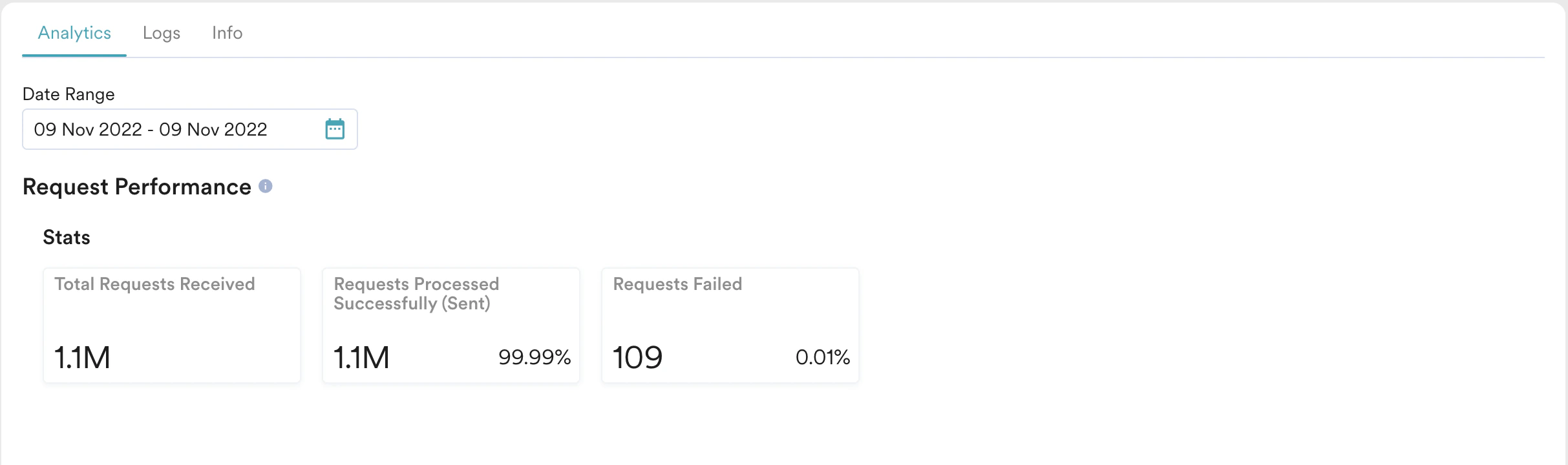
Stats available
This section shows the number of requests received by the Alert API for a given Alert ID and has the following metrics:- Total requests received
- Count and Percentage of requests processed successfully by MoEngage (sent to your chosen Email / SMS service provider)
- Count and Percentage of requests that failed to be processed and sent by MoEngage
Error Table
The Request (API level) errors are shown in a table as illustrated below. The error table contains the following information:- Error code
This field contains the error code returned by the API for the request. - Error
This field contains information about the type of error encountered while processing the request. - Description
This field contains a description of the error returned by the API for the request. - Count(%)
This field contains the number & percentage of errors (as a total of total errors) encountered for each error type.

List of Possible Errors
Here is a list of possible errors that may occur at the API level.Time Trends
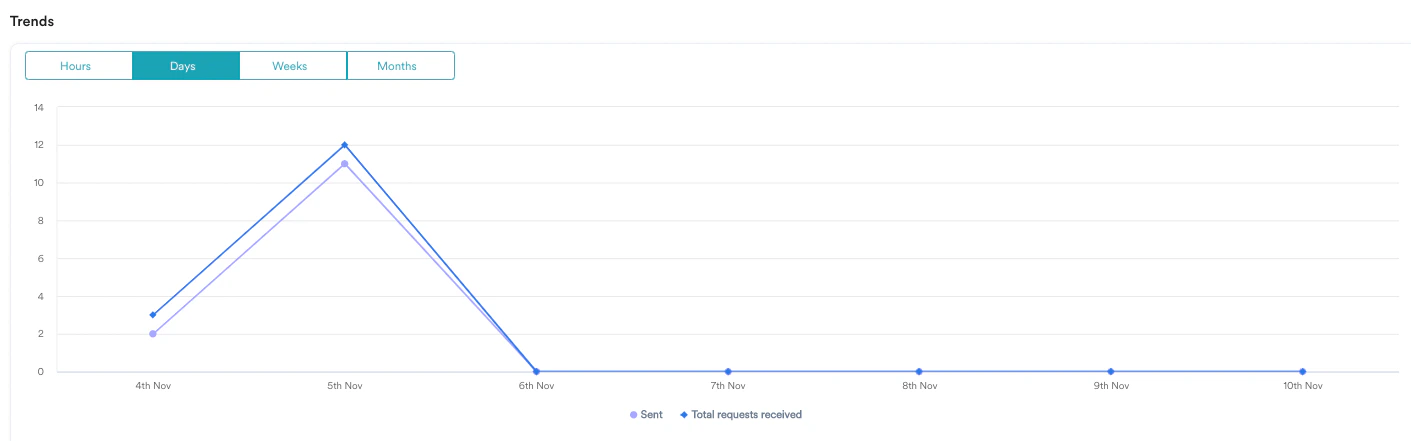
The Trends section showcases the performance of the Alerts based on the following granularities:- Hours
- Days
- Weeks
- Months
Channel Performance
The channel performance is available for all the channels configured in the Alert.Stats available
This section varies according to the channel. The channel-level metrics and error details are available here.- SMS Stats
- Email Stats
- Push Stats
- WhatsApp Stats
The following stats are available for the SMS channel:
- Total Requests Received
This is the total number of requests received for a given Alert with SMS channel details as part of the payload. In the case of Alerts with multiple channels, this number denotes the number of requests with SMS as part of it. - Requests Processed Successfully (Sent)
This is the total number of SMS requests processed successfully or sent to the vendor successfully. - Delivered
This is the total number of requests that have been delivered to the user. This is only available for Alerts employing native SMS connectors in MoEngage. - Clicks
This is the total number of clicks by all the users (who have received the messages) for the links in the message. In cases where multiple links are present in the message, this will show the aggregate of total clicks across all links. - Delivery Failed
This is the total number of requests for which the SMS notification has not been delivered. This information is passed on to the SMS vendor and can represent various reasons like the Recipient is unreachable, the Inbox full, and so on. For more information, refer to Common SMS Errors.